Skip to content

Private AI deployment options: Cloud, Managed, On-premises, Air-gapped

DocsGPT runs in four postures — Cloud, Managed, On-premises and Air-gapped — plus a free self-hosted community route. Every posture is available from one seat; the platform, licence (MIT) and features are the same in each. Some vendors gate on-premises behind thousands of seats; DocsGPT does not. A large Central European bank runs it fully air-gapped on its existing NVIDIA T4 GPUs.

MIT licence · v0.21.0 · every posture from one seat

Last updated: · Facts checked on

Deployment posturesoperator · data boundary · LLM
  1. Cloud

    operatorArc53
    data boundaryArc53 multi-tenant cloudEU region
    network boundary
    llm locationCloud provider
  2. Managed

    operatorArc53
    data boundaryDedicated VPSyour region
    network boundary
    llm locationCloud provider or local engineor your own key (BYOM)
  3. On-premises

    operatorCustomer
    data boundaryYour network
    egress optional (hybrid)
    llm locationLocal engineor your cloud LLM (hybrid)
  4. Air-gapped

    operatorCustomer
    data boundaryYour networkno egress
    no external network
    llm locationLocal engine only
Text version

Cloud: Arc53 operates a multi-tenant service and the LLM runs at a cloud provider. Managed: Arc53 operates a dedicated instance in your chosen region; the LLM runs at a cloud provider, on a local engine on the instance, or with your own key (BYOM). On-premises: you operate DocsGPT inside your network; the LLM runs locally, or (hybrid) prompts cross the boundary to a cloud provider you choose. Air-gapped: zero external network; LLM, embeddings, vector store and storage all run inside your perimeter.

24 h → 16 min

A large Central European commercial bank processes 10,000+ inbound documents a day; time-to-action fell from 24 hours to 16 minutes, with over 99.5 % classification accuracy, running fully air-gapped on the bank's existing NVIDIA T4 GPUs.

Source: EU bank, name under NDA

5,000+ documents · flat monthly fee

Dedicated managed instance for a specialist consultancy: 5,000+ documents, SSO, one flat monthly fee with no per-seat licence.

Source: No Deviation

18.3k GitHub stars

Open source under the MIT licence, with 226+ contributors. The same code runs in every posture.

Source: GitHub

Compare the four deployment postures

Same platform, same MIT licence, same features. The differences are who operates it, where data lives, where the model runs and how it is priced.

Cloud and Managed are operated by Arc53 — Cloud on shared infrastructure in the EU region, Managed on a dedicated server in the Americas, Europe, Middle East, Africa or Asia. On-premises and Air-gapped are operated by the customer with Arc53 support, inside the customer's own network; Air-gapped adds a zero-egress rule and a local-only LLM. Cloud is priced per seat at $20/seat/month; Managed is a flat fee from $2,000 a month; On-premises and Air-gapped are from $10,000, one-time or recurring, with no per-seat licence. Every posture is available from one seat.

DocsGPT deployment postures compared
 CloudManagedOn-premisesAir-gapped
Who operates itArc53Arc53Customer, with Arc53 supportCustomer, with Arc53 support
Where data livesArc53 multi-tenant cloud, EU regionDedicated VPS operated by Arc53 in the Americas, Europe, Middle East, Africa or AsiaCustomer data centre or private cloudCustomer network, no external egress
Where the LLM runsCloud provider via Arc53Cloud provider via Arc53, a local engine on the instance, or your own provider key (BYOM)Local engine (llama.cpp · Ollama · TGI · SGLang · vLLM · Aphrodite · FriendliAI · LMDeploy) or a customer-chosen cloud LLM (hybrid)Local engine only
IdentityEmail and password, or OIDC SSO; SCIM 2.0OIDC SSO, SCIM 2.0OIDC SSO (Okta, Keycloak, Authentik, Entra ID), SCIM 2.0, RBACSame, against the internal IdP
Time to first answerMinutes (sign-up)DaysAbout one week to a working POCAbout one week where hardware exists
Support tierPriority support, 99.9 % uptimeDedicated support under an SLA, 99.9 % uptimeProduction support contract (included in the recurring option)Production support contract (included in the recurring option)
Pricing structure$20/seat/monthfrom $2,000/month, flat, usage allowance includedfrom $10,000, one-time or recurring — no per-seat licencefrom $10,000, one-time or recurring — no per-seat licence
Who it fitsTeams with non-sensitive or internal data wanting a start today50–2,000-staff firms that need someone else to run itRegulated organisations with data-residency rulesBanks, government, defence: policy forbids any external network

Self-hosted (community)

Free, MIT, unlimited users, community support, you operate it. One install command, Docker Compose, about five minutes.

curl -fsSL https://docs.ac/install | bash →

Every posture from one seat

There is no seat minimum for On-premises or Air-gapped. A single regulated team can run DocsGPT inside its own network under the same MIT licence, with the same connectors, agents, guardrails and identity integration as a two-thousand-seat rollout; pricing is flat infrastructure plus support, not a licence per user.

Some vendors publish on-premises only above several thousand seats — Langdock offers on-premises via Helm from 5,000 seats and nothing air-gapped; Glean has no true on-premises option. DocsGPT's On-premises and Air-gapped postures start at 1 seat.

Facts checked on

Per-seat pricing vs flat infrastructure

Per-seat products price every user, cap heavy users on tokens and add metered API overage. A self-hosted or on-premises DocsGPT deployment is flat infrastructure plus support, with no per-seat licence.

Per-seat list prices and seat minimums compared with DocsGPT
 List priceSeat minimumOn-premises
Microsoft 365 Copilot$30/user/month listNone published (requires M365)No
Glean~$50–75/user/month (not published)~100 seatsNo true on-premises
DocsGPT$20/seat/month (Cloud); Managed from $2,000/month; On-premises and Air-gapped from $10,000, one-time or recurringNoneYes, from one seat

List prices and published minimums, checked 2026-09-06. Glean does not publish pricing; the range is as reported.

Identity, roles and audit

Single sign-on, provisioning, roles and an append-only audit table are in the open-source build and available in every posture.

SSO

OIDC single sign-on

Authorization Code + PKCE, group allowlists, admin-group mapping and back-channel logout against your identity provider.

AUTH_TYPE=oidc · Okta · Keycloak · Authentik · Entra ID

Provisioning

SCIM 2.0

User lifecycle driven by the IdP: accounts are created, deactivated and reactivated from your directory. Deprovisioning revokes sessions immediately.

scim 2.0 · users · immediate revocation

Roles

Global roles plus per-object sharing

User and admin roles across the workspace; Viewer / Editor sharing per agent and per source, applied at retrieval time.

admin · user · viewer · editor

Audit

Append-only audit table

Authentication events are recorded append-only and can be exported for compliance review.

auth-events · append-only · exportable

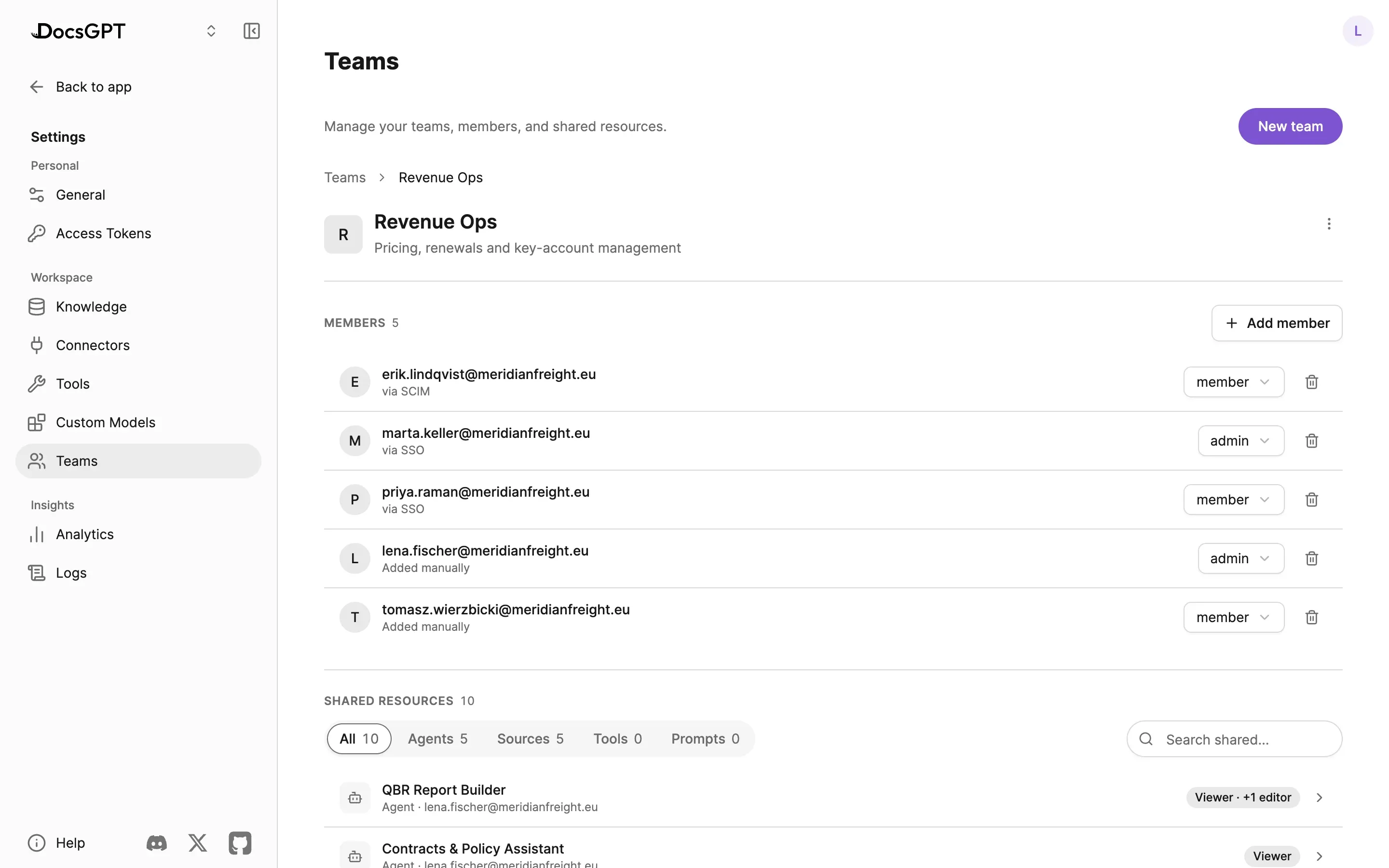
app · Teams › Customer Support
The Customer Support team, six members: each row carries the account, how it arrived — Added manually, via SSO or via SCIM — and its role, admin or member, in a dropdown. Below, six shared resources (two agents, the internal wiki, two prompts and a search tool) each marked Editor or Viewer.
app · Teams › Customer Support
The Customer Support team, six members: each row carries the account, how it arrived — Added manually, via SSO or via SCIM — and its role, admin or member, in a dropdown. Below, six shared resources (two agents, the internal wiki, two prompts and a search tool) each marked Editor or Viewer.

Detail on roles, audit and analytics: Admin, Security & Analytics · Security.

Hardware sizing

Local inference runs on the customer's existing GPUs. The bank reference runs its document-classification pipeline on NVIDIA T4 GPUs. Model choice is benchmarked against the target hardware before rollout, so the model fits the GPU rather than the other way round.

Hardware fit and sizing by model class →

Engines and registry: Models & BYOM.

Settings › Models
model registry3 models · hot-swap, no restart
  • Qwen3.8-Flash-Next

    Ollama · http://ollama:11434

    defaultlocal
  • GLM-5.3-Flash

    vLLM · http://gpu-01:8000/v1

    local
  • GPT-5.6 Sol

    DocsGPT · api key · via Arc53

    cloud
  • + Add model bring your own · openai-compatible

    base url https://…/v1api key ••••••••model id my-model

How a deployment happens

Six steps from scoping call to rollout.

  1. 01

    30-minute scoping call

    Posture, data sensitivity, seats and identity provider.

    cloud · managed · on-premises · air-gapped

  2. 02

    Posture and model choice

    Hardware check where inference will run locally.

    gpu class · vram · model candidates

  3. 03

    Install

    Cloud sign-up, Managed provisioning by Arc53, or the one-line installer (Docker Compose) or Kubernetes manifests in the customer's environment.

    docs.ac/install · docker compose · deployment/k8s

  4. 04

    Connect sources and the IdP

    Two or three sources to start; OIDC single sign-on and SCIM.

    sharepoint · google drive · confluence · s3 · oidc

  5. 05

    One-week POC

    A benchmark suite is the acceptance test.

    docsgpt-cli bench

  6. 06

    Rollout

    Teams, roles, audit and channels. Production-ready in 30 days.

    teams · roles · audit · widget · telegram · discord

Frequently asked questions

Can AI be on prem?

Yes. DocsGPT runs entirely inside a customer's data centre or private cloud, including the language model, embeddings and vector store. A large Central European bank runs it fully air-gapped on its existing NVIDIA T4 GPUs.

What is the difference between cloud and on-premise AI?

In the cloud, the vendor operates the software and the model provider processes prompts. On-premises, the customer operates the platform and can keep the model local; nothing leaves the network unless a hybrid cloud LLM is chosen.

Is there a seat minimum for on-premises deployment?

No. All four postures are available from one seat; on-premises and air-gapped pricing is flat infrastructure plus support.

Can I move from Cloud to Managed or On-premises later?

Yes. The same open-source platform runs in every posture, and Arc53 migrates your sources, agents and settings on request.

Choose a posture with an engineer

A 30-minute demo on your use case, or a free on-premises review of your hardware and identity setup.