Stays inside your network
Documents, retrieval and users
Source documents, embeddings, the vector store, user accounts, roles and logs never leave the customer's network.
documents · embeddings · vector store · users · logs
DocsGPT runs on-premises in your data centre or private cloud with Docker Compose or Kubernetes manifests, using a fully local stack or, in hybrid mode, a cloud LLM provider of your choice while documents stay inside your network. It runs on the GPUs you already have — the bank reference runs on existing NVIDIA T4s, in the stricter air-gapped posture — under the MIT licence, with no per-seat licence.
docker compose · kubernetes · pip · 8 documented engines: llama.cpp / ollama / tgi / sglang / vllm / aphrodite / friendliai / lmdeploy · pgvector · oidc + scim · MIT
Last updated:
Cloud
Managed
On-premises
Air-gapped
Cloud: Arc53 operates a multi-tenant service and the LLM runs at a cloud provider. Managed: Arc53 operates a dedicated instance in your chosen region; the LLM runs at a cloud provider, on a local engine on the instance, or with your own key (BYOM). On-premises: you operate DocsGPT inside your network; the LLM runs locally, or (hybrid) prompts cross the boundary to a cloud provider you choose. Air-gapped: zero external network; LLM, embeddings, vector store and storage all run inside your perimeter.
Every layer has a local option; nothing in the platform requires an external service.
Every layer of an on-premises DocsGPT deployment has a local option: inference through any OpenAI-compatible engine, with eight documented; embeddings on FastEmbed with ONNX Runtime; pgvector, Qdrant, Milvus, Elasticsearch, MongoDB Atlas or FAISS for vectors; local disk for files on Docker installs, an S3-compatible bucket on Kubernetes; PostgreSQL for user data; Celery and Redis for jobs; an optional decision model inside the API on CPU, as a sidecar or on a GPU server; OIDC and SCIM for identity; execution traces, with OpenTelemetry export off by default.
| Components | Notes | |
|---|---|---|
| Inference engines | llama.cpp · Ollama · TGI · SGLang · vLLM · Aphrodite · FriendliAI · LMDeploy | Connected as an OpenAI-compatible server (LLM_PROVIDER=openai + OPENAI_BASE_URL); any other OpenAI-compatible endpoint works too |
| Embeddings | FastEmbed on ONNX Runtime | Default granite-311m on fresh installs; installs with an existing index stay on all-mpnet-base-v2 until re-embedded. Other FastEmbed models work too |
| Vector store | pgvector · Qdrant · Milvus · Elasticsearch · MongoDB Atlas · FAISS | pgvector is required for hybrid search and GraphRAG, and is what the Kubernetes manifests use |
| File storage | Local disk | The default on Docker installs — no object-storage service required. The Kubernetes manifests expect an S3-compatible bucket (an internal S3, MinIO, Ceph) or a shared volume |
| User-data store | PostgreSQL | Managed Postgres supported |
| Background jobs | Celery + Redis | Ingestion, scheduled agents, workflows |
| Decision model | arc-decide | Optional. Runs inside the API on CPU, as a sidecar, or on a GPU server; scores prompt injection and labels conversations for Insights, and on a GPU also reranks search results |
| Identity | OIDC + SCIM 2.0 | Okta, Keycloak, Authentik, Entra ID documented |
| Observability | Execution traces · OpenTelemetry | Traces in the app; OpenTelemetry export is off by default and goes to Langfuse, Datadog, Grafana or any OTLP collector you run |
Choose the embedding model before the first ingest. Vectors from different models do not mix, so changing EMBEDDINGS_NAME later means re-embedding every source with docsgpt reembed.
DocsGPT runs inside the customer's network and calls a cloud LLM provider chosen by the customer; documents, embeddings and the vector store stay on-premises, prompts and retrieved passages leave to the provider.
Stays inside your network
Source documents, embeddings, the vector store, user accounts, roles and logs never leave the customer's network.
documents · embeddings · vector store · users · logs
Crosses to your provider
Only the prompt and the passages retrieved for it are sent to the cloud LLM provider, under the customer's own key.
prompt · retrieved passages · your API key
providers: OpenAI · Azure OpenAI · Anthropic · Google Gemini · Groq · OpenRouter · Novita · Hugging Face · any OpenAI-compatible endpoint
Hybrid is not air-gapped. If policy forbids any external network, see Air-gapped.
Six steps from an empty environment to a benchmarked deployment.
Install with the one-line installer, pip or Kubernetes
Run curl -fsSL https://docs.ac/install | bash on the host and answer "OpenAI-compatible server" to the provider question with the local engine's endpoint; a server sets up without questions with bash -s -- --yes --domain … --provider openai-compatible …. Without Docker, install with pip and run docsgpt up --native against your own Postgres and Redis. On Kubernetes, apply the manifests in deployment/k8s with kubectl apply -k, with pgvector and an S3-compatible bucket. ARM builds are available.
docs.ac/install · docsgpt up --native · kubectl apply -k deployment/k8s
Point DocsGPT at the local engine
Give the engine's endpoint as an OpenAI-compatible server; its models appear in the model picker for chats and agents.
LLM_PROVIDER=openai · OPENAI_BASE_URL=http://gpu-01:8000/v1
Connect the IdP and enable SCIM
OIDC single sign-on with group allowlists; SCIM 2.0 for provisioning.
AUTH_TYPE=oidc · scim 2.0
Connect knowledge
SharePoint, Google Drive, Confluence, GitHub, S3 and uploads, with OCR for scanned documents.
sharepoint · google drive · confluence · github · s3 · ocr
Harden and back up
docsgpt doctor checks the machine; set your own ENCRYPTION_SECRET_KEY and work through the security checklist; docsgpt backup and restore cover Docker installs.
docsgpt doctor · security checklist · docsgpt backup
Benchmark before rollout
Run a benchmark suite as the acceptance test.
docsgpt-cli bench
Qwen3.8-Flash-Next
Ollama · http://ollama:11434
GLM-5.3-Flash
vLLM · http://gpu-01:8000/v1
GPT-5.6 Sol
DocsGPT · api key · via Arc53
+ Add model bring your own · openai-compatible
Model choice is benchmark-driven, so the pipeline is sized to the hardware in the rack rather than to a procurement request.
For constrained hardware the model is chosen by running the customer's own benchmark suite against the candidates. In one bank proof of concept, Qwen 3.6 was selected from five-plus open-source models on custom benchmarks; in production the classification pipeline is sized to legacy NVIDIA T4 GPUs.
That bank runs air-gapped — the same on-premises stack with a zero-egress rule and a local-only model. The same sizing applies to either posture.
Hardware fit and sizing by model class →
See also Models & BYOM · Banking · Government.
24 h → 16 min
A large Central European commercial bank processes 10,000+ inbound documents a day; time-to-action fell from 24 hours to 16 minutes, with over 99.5 % classification accuracy, running fully air-gapped on the bank's existing NVIDIA T4 GPUs.
Source: EU bank, name under NDA · air-gapped deployment
Government infrastructure, local inference
UK Department for Work and Pensions: an internal knowledge assistant on government infrastructure, with local inference.
Source: DWP
SSO, provisioning, roles, the audit log, guardrails and approval gates, all in the open-source build.
SSO
Authorization Code + PKCE, group allowlists, admin-group mapping and back-channel logout against your identity provider.
AUTH_TYPE=oidc · Okta · Keycloak · Authentik · Entra ID
Provisioning
User lifecycle driven by the IdP: accounts are created, deactivated and reactivated from your directory. Deprovisioning revokes sessions immediately.
scim 2.0 · users · immediate revocation
Roles
Admin and user roles, team roles, and Viewer / Editor sharing on every agent, knowledge source, prompt and tool, applied at retrieval time. Owners decide whether editors can reshare, and a sponsor keeps a shared agent working with their access.
admin · user · team · viewer · editor · sponsor
Audit
Sign-ins, provisioning, role and account changes, access tokens, quotas and guardrail decisions in one append-only audit log, exported as CSV or NDJSON.
audit log · append-only · csv · ndjson
Guardrails
Seven built-in checks (PII, secrets, banned terms, prompt injection and more), plus a prompt-injection model that runs inside your deployment, flag, redact or block under a floor no agent can weaken; every decision shows in Guardrail activity.
pii · secrets · denylist · prompt-injection · injection model · floor
Approval
Tool calls and responses can require a person to approve before they run or leave the system.
approve · reject · tool-call gate
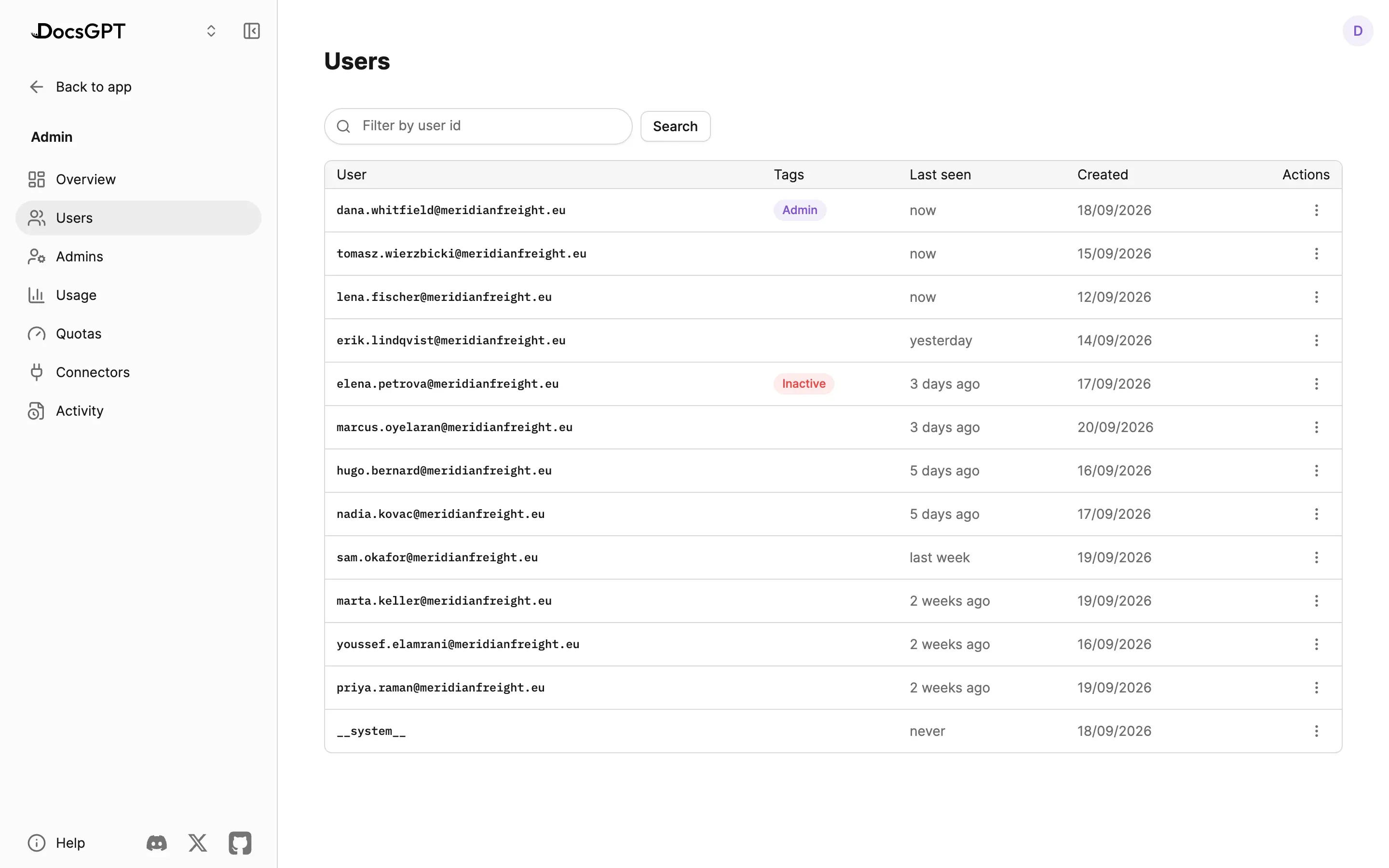
Usage quotas and execution traces too: Admin, Security & Analytics · Security.
Your environment, your data, your model. A one-week proof of concept with a benchmark suite as the acceptance test — not a twelve-month consulting engagement.
Day 1 — Install: DocsGPT installed in the customer's environment. Days 2–3 — Connect: Two or three sources and the identity provider connected. Days 3–5 — Build: First agent or workflow, with a benchmark suite. Day 5 — Review: Reviewed against the acceptance checks. Your environment, your data, your model — a one-week proof of concept, not a twelve-month consulting engagement.
1–2 days → ~5 min
Transfer-document review that took 1–2 working days (P95) now completes in about 5 minutes, with 12 deterministic and agent checks and human approval for uncertain cases.
Source: Bank (POC), name under NDA
A 30-minute demo on your documents, or a free on-premises review: hardware and model recommendation and a stack blueprint from an Arc53 engineer.
Can we use analytics cookies? They show us which pages lead people to sign up, and connect this visit to your DocsGPT account if you create one. If you say no, we still count page views, but store nothing on your device. Privacy Policy