Skip to content

SSO, SCIM, RBAC and audit log for a private AI assistant

DocsGPT supports OIDC SSO with any spec-compliant identity provider, SCIM 2.0 provisioning, server-side roles with teams and per-resource sharing, an append-only audit log, per-agent token and cost attribution, and OpenTelemetry export to your existing monitoring.

AUTH_TYPE=oidc · /scim/v2 · auth_events

Last updated: · Facts checked on

Identity and admin flowfig. 1
Identity, provisioning, audit and telemetry flowAn identity provider signs users in over OIDC and drives the user lifecycle over SCIM; the DocsGPT backend resolves global and team roles and writes an append-only audit log; OpenTelemetry optionally exports to a collector.Identity providerAuthentik · KeycloakOkta · any OIDCDocsGPT backendroles resolvedserver-sideOTel collectorDatadog · GrafanaJaeger · OTLPTeams · sharingteam_admin / membergrants · quotasauth_eventsappend-onlyyour PostgreSQLOIDCSCIM 2.0OTLPOIDC = Authorization Code + PKCE · SCIM = /scim/v2 · SCIM and OTel off by default
Text version

Your identity provider (Authentik, Keycloak, Okta, or any OIDC provider with a discovery document) signs users in to the DocsGPT backend over OIDC with Authorization Code and PKCE, and drives the user lifecycle over SCIM 2.0 at /scim/v2: create, deactivate and reactivate. The backend resolves global and team roles server-side on every request and writes sign-ins, denials, silent renewals, back-channel logouts, SCIM lifecycle changes, role changes, admin actions and team and sharing events to the append-only auth_events table in your PostgreSQL. Optionally, OpenTelemetry (off by default, as SCIM is) exports traces to the collector you configure: Datadog, Grafana, Jaeger, Honeycomb, Axiom or any OTLP endpoint.

Single sign-on (OIDC)

Any spec-compliant provider with a discovery document. Authentik, Keycloak and Okta are documented.

AUTH_TYPE selects the model. Left unset (None) there is no authentication at all; the other values are simple_jwt, session_jwt and oidc. With OIDC, DocsGPT signs users in through any spec-compliant provider using Authorization Code + PKCE.

Group-based sign-in allowlists decide who may enter; admin-group mapping decides who administers. Both are re-evaluated at every sign-in and every silent renewal, so removing someone from a group cuts their access at the next renewal rather than at session expiry. Back-Channel Logout (v0.17.3) ends sessions when the IdP says so. Persisted admin roles apply under oidc only. The token-only modes can never hold the admin role.

AUTH_TYPE=oidc · PKCE · group allowlist · back-channel logout

Identity providers and protocols
 ProtocolSupport
AuthentikOIDCProvider and issuer setup, group claim, refresh tokens, back-channel logout, SCIM provider
KeycloakOIDCIssuer, standard flow with PKCE S256, group-membership mapper, back-channel logout URL
OktaOIDCThe default web-app configuration works with no extra toggles. SCIM connector setup is documented
Any OIDC provider with discoveryOIDCSupported. Token-endpoint authentication follows the provider's discovery document
IdP SCIM clientsSCIM 2.0/scim/v2 for the user lifecycle. Group provisioning is not supported

SCIM 2.0 provisioning

Users arrive and leave with your directory, not with an invitation e-mail.

DocsGPT exposes a SCIM 2.0 endpoint at /scim/v2. Your identity provider creates users when they are assigned the app, deactivates them when they leave and can reactivate them; deactivation revokes the user's sessions immediately.

Joiners, movers and leavers are handled in one system, with every event in the audit log, which is what an access review asks for.

Before you enable it

SCIM is off by default. Set SCIM_ENABLED=true and give the IdP's SCIM client a long random bearer token in SCIM_TOKEN; both are required.

Also set OIDC_USER_ID_CLAIM=email and have the IdP send the e-mail as the SCIM userName. SCIM matches users by userName against the DocsGPT user id, so with the default sub claim the provisioned account and the account that signs in never line up, and every person ends up with two unrelated accounts.

SCIM_ENABLED=true · SCIM_TOKEN · OIDC_USER_ID_CLAIM=email

  1. 01

    Assign the app in your IdP

    The IdP creates the account over SCIM before the user's first login; a duplicate userName is refused with 409. No invitation e-mail, no manual account.

    POST /scim/v2/Users

  2. 02

    The user signs in with SSO

    OIDC Authorization Code + PKCE. Group allowlists decide who may sign in and admin-group mapping decides who administers; both are re-checked at every silent renewal.

    AUTH_TYPE=oidc

  3. 03

    The IdP deactivates or restores them

    Deactivation revokes live sessions immediately and blocks sign-in; reactivation restores access. Back-Channel Logout (v0.17.3) revokes sessions for an IdP-initiated sign-out.

    active=false → sessions revoked

What the SCIM 2.0 endpoint supports
 EndpointBehaviour
DiscoveryGET /ServiceProviderConfig · /ResourceTypes · /SchemasThe three discovery documents an IdP reads before it provisions.
ListGET /UsersThe exact filter userName eq "…" with startIndex/count pagination, 200 per page at most.
CreatePOST /UsersCreates the account ahead of first login; an existing userName returns 409.
ReadGET /Users/<id>One user.
Activate / deactivatePUT · PATCH /Users/<id>The active attribute (Okta's string "true"/"false" accepted). userName is immutable and other attributes are ignored. SCIM drives the lifecycle, not profile sync.
Soft deleteDELETE /Users/<id>Deactivates the account rather than removing its data.
Groups/scim/v2/GroupsNot supported. Listing returns an empty result so IdP probes do not fail; mutations return 501. Use the OIDC group allowlist for group-based access instead.

Roles, teams and sharing

Two independent permission planes: global roles for the whole instance, team roles inside a team.

Every account holds the global user or admin role. Roles are enforced server-side on every request and never trusted from the token; the UI never decides access.

Inside a team a user is a team_admin or a team_member. The two planes never mix: a global admin is a superuser over every team, but a team admin is not a global admin. Teams (v0.18) are self-serve: any user can create one and manage its membership.

user · admin · team_admin · team_member · quotas

Global and team roles
 PlaneCapabilities
userGlobalThe default. Owns their own conversations, sources, agents, prompts and tools.
adminGlobalEverything a user can do, plus the admin dashboard: user management, force-logout, role management, instance-wide usage and audit. A superuser over every team.
team_memberTeamBelongs to the team; can use the resources shared with it.
team_adminTeamManages membership and team settings. Implies team_member. It is not a global admin.

Sharing

Four resource types, two access levels

Agents, sources, prompts and tools can be shared with a whole team or a single member. Only the owner of a resource can share it, and sharing is additive, so it never transfers ownership. Viewer is read-only; editor can read and modify but cannot delete or re-share. Conversations are not among the shareable resource types; a conversation is shared with a link instead.

agents · sources · prompts · tools

Membership

Owner, transfer and the last-admin guard

The team owner is distinct from team_admin, and ownership can be transferred. Membership changes are guarded so a team can never be left without an admin. Members are added by e-mail or subject id, and the invitee must have signed in at least once so DocsGPT can resolve them to an account.

transfer_owner · last-admin guard

Admin dashboard

User management and force-logout

Admins activate and deactivate accounts (deactivation revokes sessions), grant and revoke the admin role, force-log-out a user, and read instance-wide usage, an authentication and admin audit feed and a separate remote-device audit feed. Per-team usage quotas cap spend. Every mutating action records the acting admin.

/api/admin · quotas

Audit log

Append-only, exportable, and separate from application logs.

The auth_events table is append-only: nine families of event (authentication, provisioning, role, admin and team) are written once and never edited.

Admins read it through the admin audit feed at /api/admin/audit, with a separate feed for remote-device commands; the table itself can be queried or exported for your SIEM or an access review.

Guardrail events have their own audit panel showing which check fired, where, and what action it took. Conversation logs with user feedback support conversation review and QA.

auth_events · append-only · export

Every row carries user_id, event, ip, user_agent, a JSONB metadata column and created_at. The acting admin is recorded in the metadata.

Events recorded in the append-only auth_events table
 EventRecorded when
Sign-inoidc_loginA user signs in successfully.
Denialoidc_login_deniedA sign-in is refused, with metadata.reason set to not_authorized (group allowlist) or account_disabled.
Silent renewaloidc_refreshA session is renewed without interrupting the user; the allowlist and admin-group mapping are re-checked.
Back-channel logoutbackchannel_logoutThe IdP revokes the user's sessions server-to-server.
SCIM lifecyclescim_created · scim_deactivated · scim_reactivatedThe IdP creates, deactivates or reactivates an account.
Role changerole_granted · role_revokedThe admin role is granted or revoked, with metadata.source set to manual or oidc_group.
Admin user actionadmin_user_activated · admin_user_deactivatedAn admin activates or deactivates a user.
Forced logoutadmin_sessions_revokedAn admin force-logs-out a user.
Teams and sharingteam.create · team.member_add · team.member_role · team.member_remove · team.share · team.unshare · team.transfer_owner · team.deleteTeam management, and every share or unshare of an agent, source, prompt or tool.

Analytics and observability

Who is spending what, and traces into the monitoring you already run.

Cost

Token and cost attribution

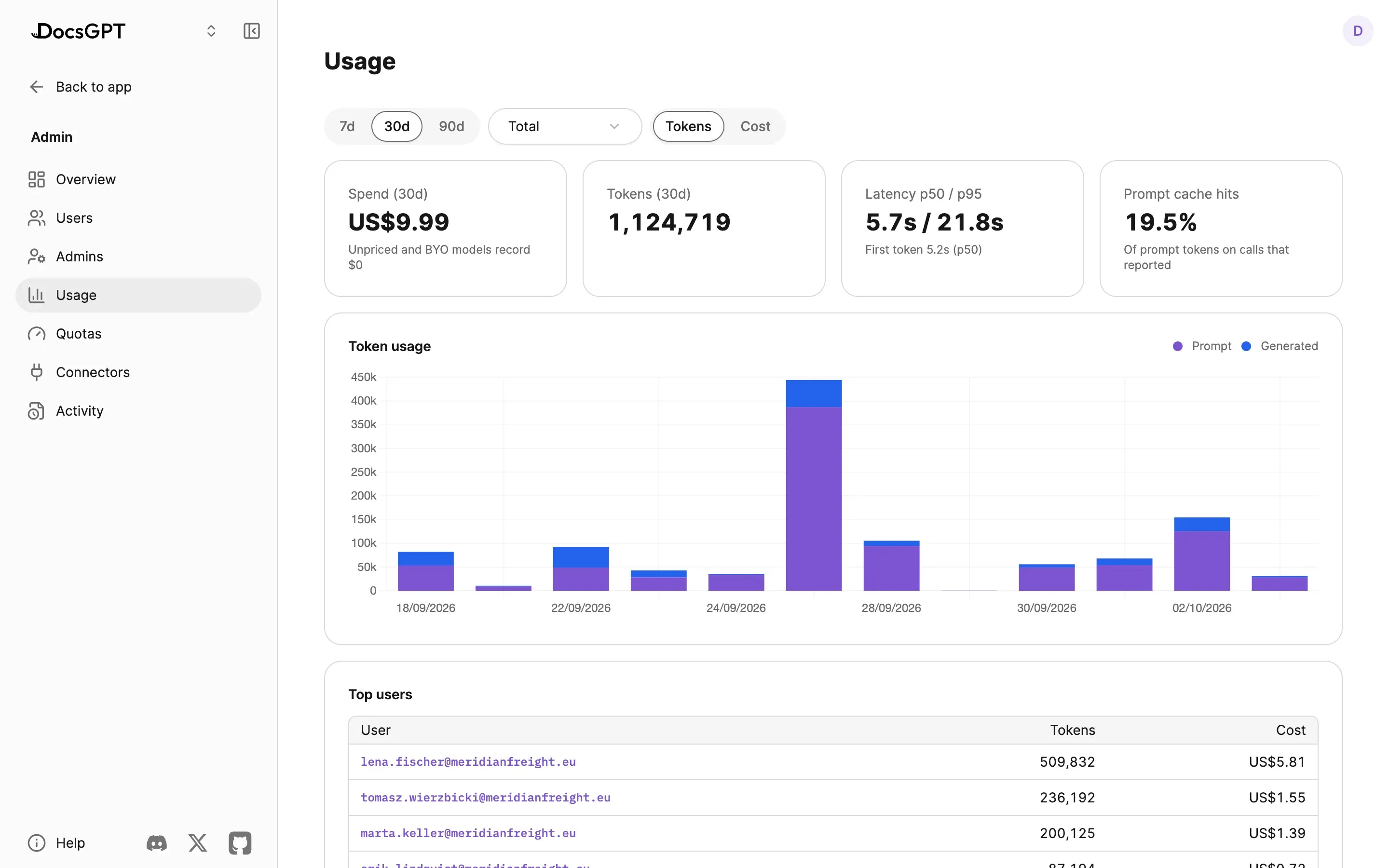
Tokens and cost per agent, per team and per user, beside conversation logs and user feedback, so a finance owner can see which agent is spending.

tokens · cost · by agent / team / user

Logs

Unified logs timeline

Chat, system, webhook, workflow and schedule events in one timeline with full-text search.

chat · system · webhook · workflow · schedule

Observability

OpenTelemetry

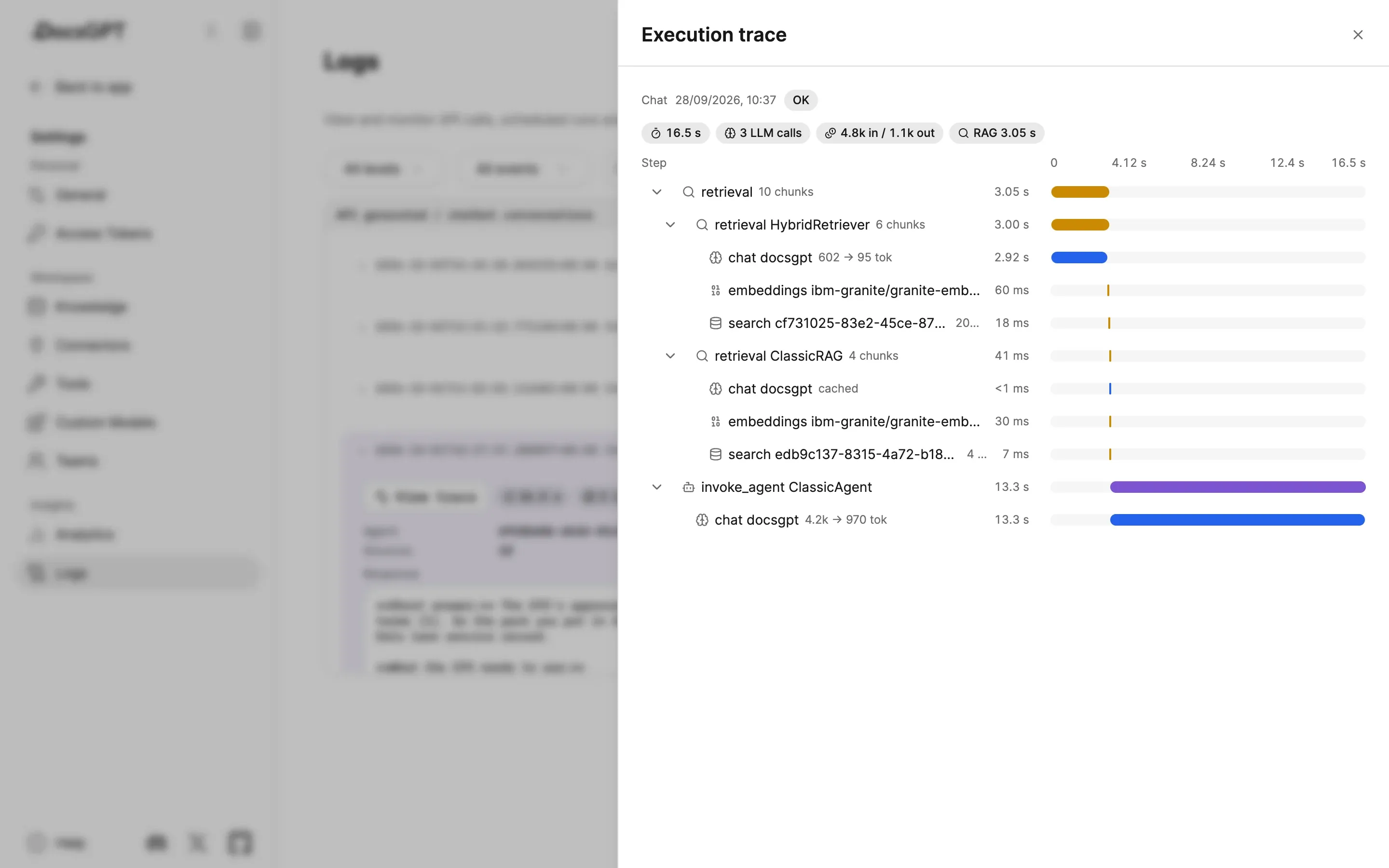
Off by default. When on, it auto-instruments Flask, Celery, SQLAlchemy, Redis and requests and exports to the collector you run.

OTLP → Datadog · Grafana · Jaeger · Honeycomb · Axiom

Security programme

At rest

Encrypted credentials

Connector tokens and tool credentials are encrypted at rest; shared tools run on the owner's credentials without exposing them.

encrypted at rest

Supply chain

SBOM and Dependabot

A software bill of materials ships with releases; dependencies are watched by Dependabot.

SBOM · Dependabot

CI

Static analysis and secret scanning

CodeQL, Bandit and zizmor run in CI; secret scanning guards the repository.

CodeQL · Bandit · zizmor

Disclosure

Coordinated disclosure

Private vulnerability reporting per SECURITY.md, with published advisories.

SECURITY.md

Programme

GitHub Secure Open Source Fund

DocsGPT joined the fund's programme in August 2026.

2026-08

The full programme, the disclosure process and certification status are on Security.

How it runs privately

Identity stays with your IdP; DocsGPT never stores passwords for SSO users. Roles, teams, the audit log and the analytics tables live in your PostgreSQL, and telemetry goes only to the collector you configure, never to Arc53. On on-premises and air-gapped deployments the IdP is inside your network too; on Cloud, Arc53 operates the database.

SSO, teams, sharing and the audit log are part of the platform in every deployment posture, self-hosted community builds included. SCIM 2.0 and the exportable audit log are available on every posture, Cloud and Managed included. See pricing for what else differs.

Example

A specialist consultancy on a dedicated instance with SSO.

Before moving 5,000+ documents onto a dedicated managed instance, a specialist consultancy asked three things: who can sign in, who administers, and what it costs per month.

The same platform and the same settings, operated by Arc53 on a single-tenant server.

Managed instance →

5,000+ documents · flat monthly fee

Dedicated managed instance for a specialist consultancy: 5,000+ documents, SSO, one flat monthly fee with no per-seat licence.

Source: No Deviation

Frequently asked questions

Does DocsGPT support SSO?

Yes. Set AUTH_TYPE=oidc and DocsGPT signs users in through any spec-compliant OpenID Connect provider with a discovery document, using Authorization Code + PKCE. The documentation uses Authentik as its reference example and carries setup notes for Keycloak and Okta. Group-based sign-in allowlists, admin-group mapping, silent renewal and Back-Channel Logout are included.

What is SCIM provisioning?

SCIM is the standard by which an identity provider creates, updates and deactivates accounts in an application. DocsGPT serves SCIM 2.0 at /scim/v2 once SCIM_ENABLED=true and SCIM_TOKEN are set: the IdP can list, create, read, deactivate and reactivate users, DELETE is a soft delete, and deactivation revokes live sessions immediately. Updates are limited to the active flag (userName is immutable and other attributes are ignored), and group provisioning is not supported, so group mutations return 501.

Is there an audit log for AI conversations?

Sign-ins, denials, silent renewals, back-channel logouts, SCIM lifecycle changes, role changes, admin activations and deactivations, forced logouts and every team and sharing event go to an append-only auth_events table that can be queried or exported. Guardrail events have their own audit panel, and conversation logs with user feedback support conversation review and QA.

Can I see token cost per team or agent?

Yes. Token usage and cost are attributed per agent, per team and per user in the analytics view, alongside conversation logs; per-team usage quotas cap spend.

Can I plug it into Grafana or Datadog?

Yes. Turn on OpenTelemetry and DocsGPT auto-instruments Flask, Celery, SQLAlchemy, Redis and requests, exporting to Datadog, Grafana, Jaeger, Honeycomb, Axiom or any OTLP collector.

See DocsGPT on your documents

A 30-minute demo of SSO, SCIM and the audit log, or a free on-premises review of your identity setup with an engineer.