1–2 days → ~5 min
Transfer-document review that took 1–2 working days (P95) now completes in about 5 minutes, with 12 deterministic and agent checks and human approval for uncertain cases.
Source: Bank (POC), name under NDA
DocsGPT guardrails check user input, retrieved sources, tool results and the final answer against seven built-in checks, including PII, secrets and prompt injection, plus a prompt-injection model, and flag, redact or block. Set a company-wide floor in Admin that no agent can weaken, and hold any answer or tool call for one-click human approval.
Last updated:
One request, four places a policy can act.
A guardrail runs at four points in every request: on the user input before retrieval, on the retrieved sources before they reach the model, on tool results before the model uses them, and on the final answer before it reaches the user.
At each point a check takes one of three actions: flag records the event and lets the request continue, redact removes the matched content and continues, block stops the request. Structured tool results, such as the JSON an API or MCP call returns, are scanned field by field. Redaction needs a check that reports the character range it matched, so it is available on four of the seven; the rest flag or block. Checks are configured per agent, so a public support agent and an internal legal agent can run different policies.
Point 4 works on a stream. A token cannot be recalled once it is sent, so the output guard withholds a window of the most recent characters, sized from the longest match any enabled check can report. It scans the held text together with the new text and releases only the prefix that is safe. So a streamed answer is checked before it reaches the user too; only the grounding check waits for the finished answer, and a block after streaming has begun retracts what was shown.
input → sources → tool results → answer
A request passes four intervention points in order. (1) The user input is checked before retrieval. (2) The retrieved sources are checked before the model reads them. (3) Tool results are checked before the model uses them. (4) The final answer is checked before the user sees it. At every point a check can take one of three actions: flag the event, redact the matched content, or block the request.
Patterns catch the formats you know; a small model of our own catches the injections patterns miss.
Seven checks ship in the box: personal information, credentials and secrets, banned terms, link policy, prompt injection, grounding in sources and LLM-judge custom policies. The first four run at all four intervention points; prompt injection runs everywhere except the final answer, and grounding runs only there. Beside them, a prompt-injection model scores user input, retrieved sources, tool results and attached files, and withholds only the source or file it flags.
| Looks for | Actions | Notes | |
|---|---|---|---|
| Personal information | Emails, phone numbers, national IDs, card numbers, IPs and IBANs, by pattern; it does not find names | flag · redact · block | All four points · default entities: email, phone, US SSN, card number |
| Credentials and secrets | API keys, access tokens and private keys, by known format | flag · redact · block | All four points |
| Banned terms | A term list you define, whole-word by default | flag · redact · block | All four points |
| Link policy | URLs whose host is outside your allowed list, or on your blocked list | flag · redact · block | All four points |
| Prompt injection (heuristic) | Instruction-override phrasings in user input, retrieved sources and tool results | flag · block | Not the final answer · start in monitor-only to tune |
| Prompt injection (model) | Direct and hidden injections and jailbreaks, read for meaning rather than phrasing, in other languages too; scored by arc-decide, DocsGPT's own model, inside your deployment | flag · block | User input, retrieved sources, tool results and attached files · withholds only the flagged source or file |
| Grounding in sources | Answers whose wording is not supported by the retrieved sources, measured by lexical overlap | flag · block | Final answer only · scored once the answer is complete |
| Custom policy (LLM judge) | A policy written in plain language, scored by a judge model | flag · block | All four points · a remote check by default, see below |
Set per agent: Monitor only or Enforce everywhere, continue or block when a check cannot run, and a check timeout. Your own checks plug in as Python classes.
A planted instruction is caught in the file or passage that carries it, before it can steer an answer.
With the prompt-injection model on, every file attached to a chat is scored in the background as soon as it is uploaded, and every passage an agent retrieves is scored once and the score kept with its text, so a passage flagged once is withheld from every agent that screens its sources. A withheld file or passage drops out on its own, marked Withheld in the answer's sources, and the answer goes on with the rest.
In the source itself, flagged chunks carry a badge, Possible or Likely prompt injection, and Flagged only lists them. Anyone who can edit the source can edit or delete a chunk, or mark it safe.
MCP servers get the same scrutiny: Admin › Guardrails can warn when a tool's description reads like instructions planted for the AI, so it is checked before anyone allows the tool.
attached files · retrieved passages · flagged only · mark as safe · mcp tool descriptions
Prompt-injection model
Set the minimum policy once in Admin; every agent inherits it.
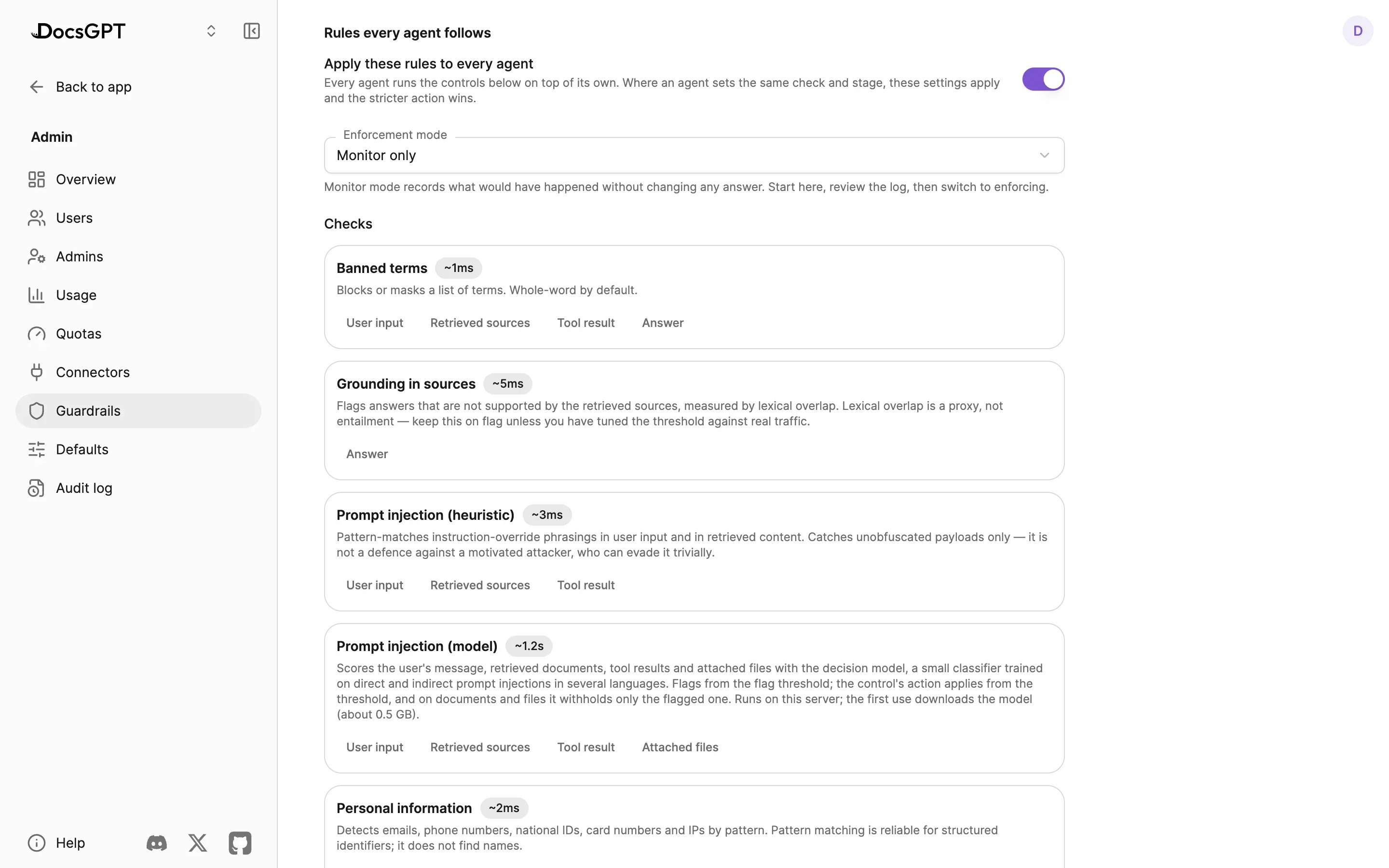
Admin › Guardrails holds the instance floor: rules every agent follows, existing agents included, edited with the same controls an agent uses. An agent can add to it or tighten it, never loosen it: where both define the same check, the stricter action wins, and a fail-closed floor keeps every agent fail-closed. The floor also covers the AI steps inside workflows.
Admin › Defaults sets the guardrails every new agent starts with, whether it is built in the editor, made from a template or imported from a file. In the agent builder, floor controls appear as active and locked, and their settings, such as banned-term lists and policy prompts, stay on the server.
Hold an answer or a tool call until a person says yes.
Approval gates apply to two things: a chat response before it is shown, and a tool execution before it runs. The reviewer sees the proposed content or the tool and its arguments, and approves or rejects it with one click.
An approval gate is not one of the four guardrail checkpoints. It pauses the agent loop before the call is made, on the proposed tool and its arguments; the tool-results check above runs afterwards, on what the call returned.
Inside a workflow, the same gate sits on a node, so a document classification that falls under a confidence threshold routes to a person instead of an action. Changes through connected services ask first by default. Nobody is there to approve during an API, widget or scheduled run, so those runs only take the actions their owner allowed in advance. Remote-device commands issued through the CLI daemon have their own approval modes, "approve and don't ask again" and a denylist.
approve · reject · logged — responses and tool calls
See every intervention, and every check that could not run.
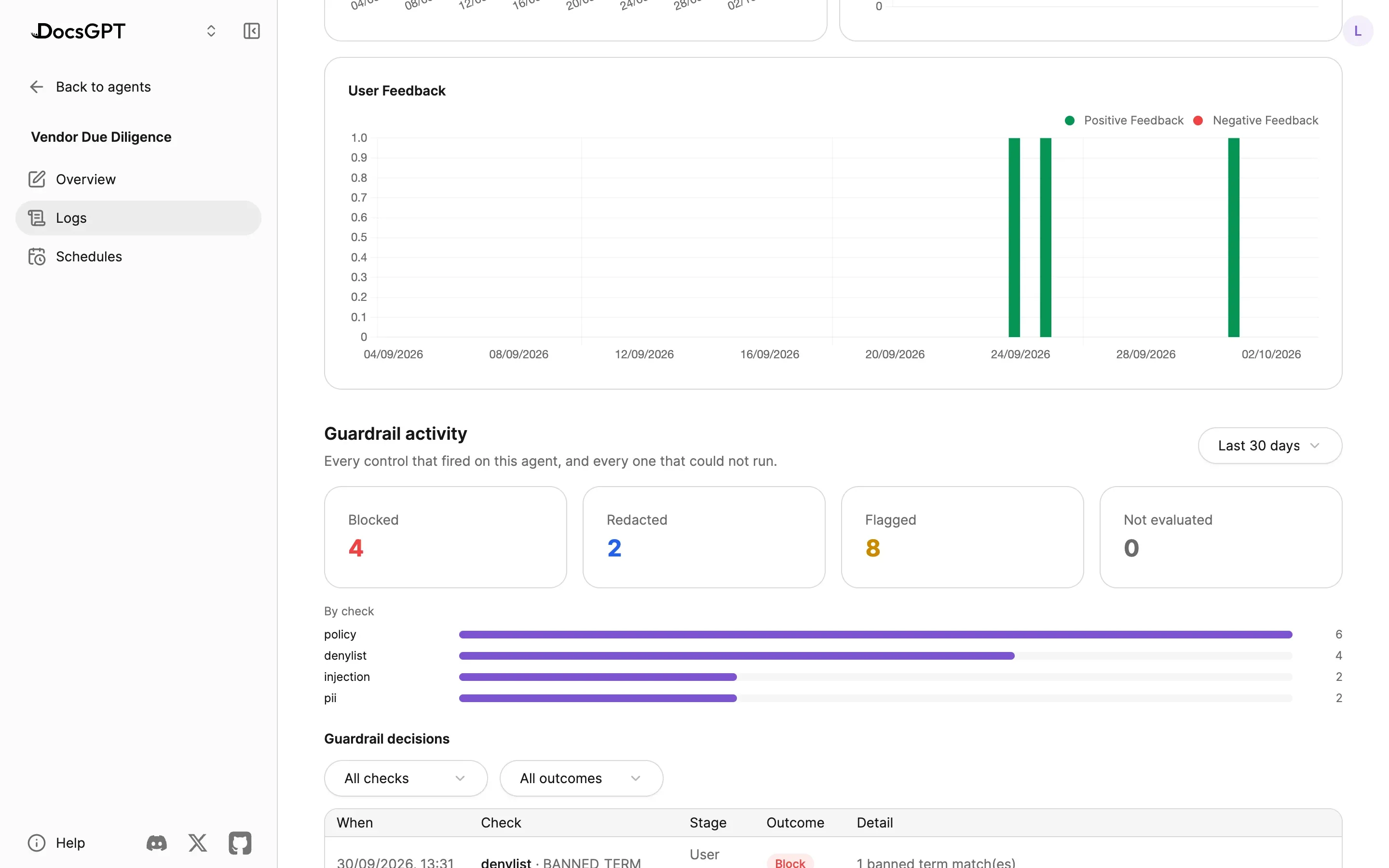
Each agent's Guardrail activity shows four totals, Blocked, Redacted, Flagged and Not evaluated, then a count per check and a table of decisions you can filter by check and outcome. "Not evaluated" matters: it is how you spot a check that silently stopped working.
The record says what matched, not the text itself, and is kept 30 days by default. The same events appear in Admin › Audit log next to sign-ins and admin changes, ready to export; see Admin, Security & Analytics and Security.
Usage quotas cap tokens or spend per user, with team and instance defaults, and tool-iteration limits cap how many tool calls an agent makes in one turn, so runaway costs and loops stop independently of any guardrail.
blocked · redacted · flagged · not evaluated · 30-day retention · usage quotas
All checks run in the DocsGPT backend, next to retrieval and tool execution. Six of the seven are local pattern or heuristic checks and make no network call at all, and the prompt-injection model runs inside your deployment too, on CPU or GPU, offline from a local copy when the network is closed. The LLM-judge check is the exception: it is a remote check by default, so it sends the text it is scanning to whichever judge model you point it at. Point it at a local model and nothing leaves the network in an air-gapped deployment. On Cloud the same checks run inside Arc53's service; nothing else differs.
Operators who would rather remove the choice set GUARDRAILS_CHECKS_ENABLED, a deployment-level allowlist of check keys. It is enforced when a control is written, not only in the UI, so a check left off the list cannot be turned on through the settings screen or the API. That is how an air-gapped instance makes a remote check unreachable rather than merely discouraged. An empty allowlist means everything registered.
Guardrails and approval gates are part of the platform in every deployment posture, not a separate tier; see pricing. Running this in a bank? See banking and financial services.
In this transfer-review deployment a fixed set of checks runs on every document, confident results proceed automatically, and anything below threshold stops for a person. Guardrails give the checks; approval gates give the stop.
1–2 days → ~5 min
Transfer-document review that took 1–2 working days (P95) now completes in about 5 minutes, with 12 deterministic and agent checks and human approval for uncertain cases.
Source: Bank (POC), name under NDA
A 30-minute demo of guardrails and approval gates on your documents, or a free on-premises review with an engineer.
Can we use analytics cookies? They show us which pages lead people to sign up, and connect this visit to your DocsGPT account if you create one. If you say no, we still count page views, but store nothing on your device. Privacy Policy