DocsGPT 1.0: Connected to Your Tools, Ready for Your Team
DocsGPT 1.0 installs in one line, connects to the tools your company uses, shows where every answer came from, and adds roles, quotas and an activity log.
Pavel Torbin9 min readreleasedeploymentknowledgesecurity
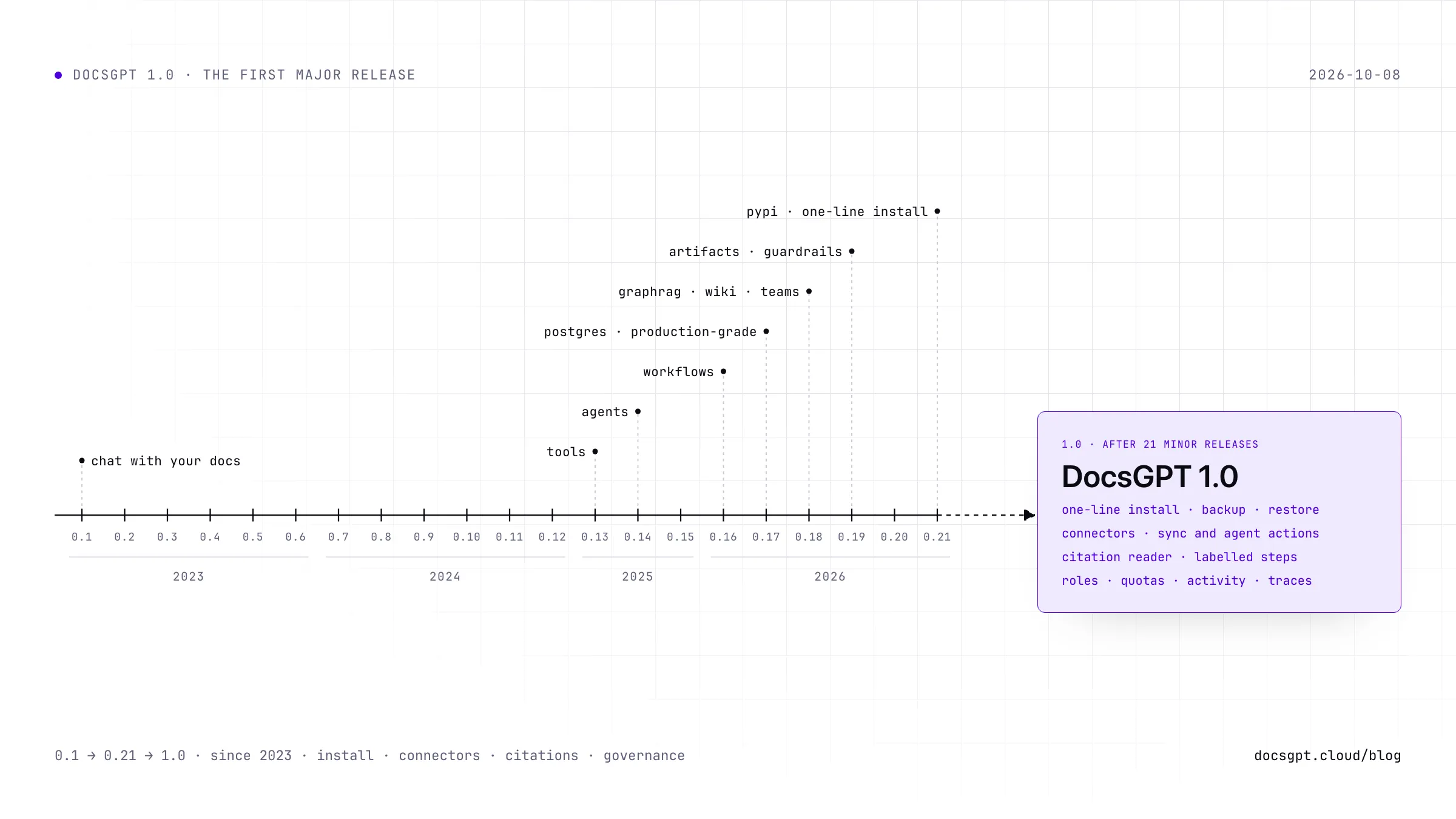
DocsGPT started in February 2023 as a way to ask questions of a project's documentation. Twenty-one releases later it runs agents, workflows, GraphRAG, artifacts and guardrails. 18.3k people have starred it on GitHub and 240 have contributed code, and every one of those releases had a zero in front of it.
This one doesn't. DocsGPT 1.0 is our first major release and the biggest we've shipped: more than 120 merged pull requests since 0.19, 95 of them in the three weeks since 0.21. It also rolls in the installer work that went out as 0.20 and 0.21. If you run DocsGPT today, a few of these changes need action before you upgrade, and they're listed at the end.
The version number moved because the questions changed. The 0.x releases were about what DocsGPT could do. The questions now are about running it at work: can you install it without an afternoon of Docker files, can it reach the Drive and Confluence where your documents actually live, and can anyone say who used it and what it cost? So 1.0 brings a one-line install with the commands to keep it running, connectors to the tools your company already uses, answers you can check against their sources, and the roles, quotas and activity log an admin needs before saying yes.
One Line to Install, a Few Commands to Run It
DocsGPT used to start with git clone and a setup script. In 0.20 it became a Python package, docsgpt on PyPI, with the API, the web UI and the worker behind one command. 0.21 put an installer in front of that package. Run curl -fsSL https://docs.ac/install | bash on macOS or Linux, or irm https://docs.ac/install.ps1 | iex in PowerShell. It installs uv and the package, asks who should reach DocsGPT and which model provider to use, and starts the app at localhost:7091. Running it again upgrades in place and keeps your settings.
1.0 adds what you need on day two. docsgpt backup writes the database and every data volume into one archive, and docsgpt restore puts them back. Settings stay out of the archive unless you ask for them, because they hold the install's secrets. docsgpt doctor checks PostgreSQL, the schema version, Redis, the model provider and the port. If you'd rather not run Docker, docsgpt up --native runs the API and the worker as launchd or systemd services against a PostgreSQL and Redis you already have. And the Kubernetes manifests are rebuilt: a migration job runs before the pods start, uploads go to an S3-compatible bucket, and the pods won't start until you replace the placeholder secrets.
The defaults got stricter too. A fresh install generates its own encryption key, and the Compose files publish on 127.0.0.1 until you say other machines should reach DocsGPT. A new security checklist covers everything else.
Why it matters: the first hour decides whether a self-hosted tool gets a second week. That hour is now one command, and the second week comes with backups.
Connectors: Connect Once, Get Knowledge and Actions
Before 1.0, a Google Drive token lived on a source, an API key on a tool, and an MCP sign-in on its server, and each one was set up separately. 1.0 puts every service credential on a connection. Connect an account once and it can sync into Knowledge on a schedule (daily, weekly, monthly or on demand), give agents actions in that service, or both.
The catalog starts with Google Drive, SharePoint and OneDrive, Confluence, GitHub, Amazon S3, Brave Search, Telegram, ntfy and PostgreSQL, plus one-click MCP presets for Notion, Linear, Jira & Confluence, Sentry, Stripe, ClickUp, Zapier, Trello, Miro and Resend. Anything else with an MCP server or an OpenAPI spec connects as a custom connector.
Every action is a read or a write, and each one is set to Allow, Ask first or Off; writes ask first by default. A shared agent can use your account or ask each person to connect their own. If an agent needs a service you haven't connected yet, a Connect card appears in the middle of the answer, and the answer carries on once you've connected. Credentials are encrypted on the server and bound to their owner, and admins decide in Admin › Connectors which connectors are allowed at all.
Why it matters: if an assistant can't see where your company keeps its documents, it turns into one more place to upload them.
Answers You Can Check
A cited answer is only useful if checking the citation is quicker than searching yourself. In 1.0, a numbered citation opens a citation reader beside the chat with the passage, the file it came from and its knowledge source, and Open in Knowledge takes you to the whole document. A file synced through a connector says where it lives: "From Google Drive".
Each step the agent takes shows up in the answer with a plain label, such as "Searched Notion" or "Used Linear: create issue", so you can see where an answer came from and what the agent did along the way. Attachments got the same treatment. The agent can search and read the whole of a long file instead of its first pages, and Add to Knowledge keeps a file you attached for later chats and agents. Answers render maths now, too.
Retrieval also changed its default. Chats without an agent, and agents that don't set a count, now pull 6 chunks per search instead of 2, so answers draw on more context.
Why it matters: if nobody can trace an answer, somebody ends up checking it by hand.
Roles, Quotas and a Record of Who Did What
Sharing was rebuilt. An agent is shared with a team together with the knowledge, prompts and tools it uses, as Viewer or Editor, and a sponsor can lend a shared agent their own access so it keeps working for everyone.
Usage quotas cap what each person spends, in tokens, dollars or both, per day, week or month. A limit set for a user overrides the team's, and the team's overrides the instance default. Personal access tokens let scripts call the API as a user, with scopes, optional resource limits and an expiry. That's what docsgpt-cli uses to apply agents from YAML in CI.
Admin › Activity puts sign-ins, admin changes, data events, the device log and guardrail events into one filterable feed that exports to CSV or NDJSON. Execution traces go out as OpenTelemetry GenAI spans, so Langfuse, Arize Phoenix, Datadog or Grafana can show you what each run did, step by step.
Why it matters: before a tool goes company-wide, someone has to answer who can use it, what it will cost, and what happened last Tuesday. Now the admin panel answers all three.
Also in 1.0
- A redesigned app. Settings live in sidebar sections (Personal, Workspace, Insights, Administration), and Sources are now called Knowledge.
- Widget 0.9.0 matches the redesigned app, takes attachments and voice input, and its search bar takes voice search.
- A fuller sandbox for the Code Executor and Artifact tools: LibreOffice, headless Chromium, OCR, ffmpeg, Node.js and fonts for Arabic, Devanagari and CJK text, so agents can convert office files, print HTML to PDF and take screenshots.
- DeepSeek-OCR, local or hosted, alongside tesseract.
- Images returned by MCP tools now reach the model.
- Schedules list the tools that need approval, and a scheduled run takes only the ones you tick.
- The API reference lives at
/api/docson every instance, with the token scope for each endpoint. - New docs: Entra ID for OIDC single sign-on, the MCP server, schedules, custom models and a Using DocsGPT section.
docsgpt devruns the API and the worker of a checkout in one terminal, reloading on save, with a mock model so contributors need no API key.
Thank you to everyone who contributed code since 0.19, among them @lorenzozanee, @L4XB, @iam-shanmukha, @vijayarawat, @simpleqt, @Areen-09, @Arthur031221, @prakashNalla, @aleenabenny0 and @Acestar21.
Upgrading From 0.21 or Earlier
Read Upgrading before you pull. Six changes need action:
- Set
ENCRYPTION_SECRET_KEYto your own value before upgrading a multi-user install. The connectors migration encrypts stored credentials with the key it finds.- The checkout Compose files now publish on
127.0.0.1. If other machines use your install, setDOCSGPT_BIND=0.0.0.0.- Schedules no longer pre-approve every tool. Existing schedules keep their approvals, so review them.
- The Swagger UI moved from
/to/api/docs.LLM_PROVIDERalone now picks the default model. An install that only set a provider key now calls that provider, and is billed by it, instead of the hosted DocsGPT model. SetLLM_NAME=docsgpt-localto keep the hosted one.- Retrieval defaults to 6 chunks instead of 2, which means more context and more tokens per answer.
The changelog has the rest.
Put It in Front of Your Company
Over the next weeks we'll go deeper on three of these: connectors, answers you can check, and governance. If you're deciding where DocsGPT should run, Deploy compares Cloud, Managed, on-premises and air-gapped.