Conversation insights and docs gaps for your AI assistant
DocsGPT Insights labels every conversation with arc-decide, a small model of our own that runs inside your deployment: was the question fully answered, did the person reach their goal, were they frustrated, did they ask for a person. Then it groups the questions your documents don't answer by page, source or topic, so you know what to write next.
fully answered · goal met · frustrated · asked for a person · docs gaps · arc-decide
Last updated:
Find the page to write next
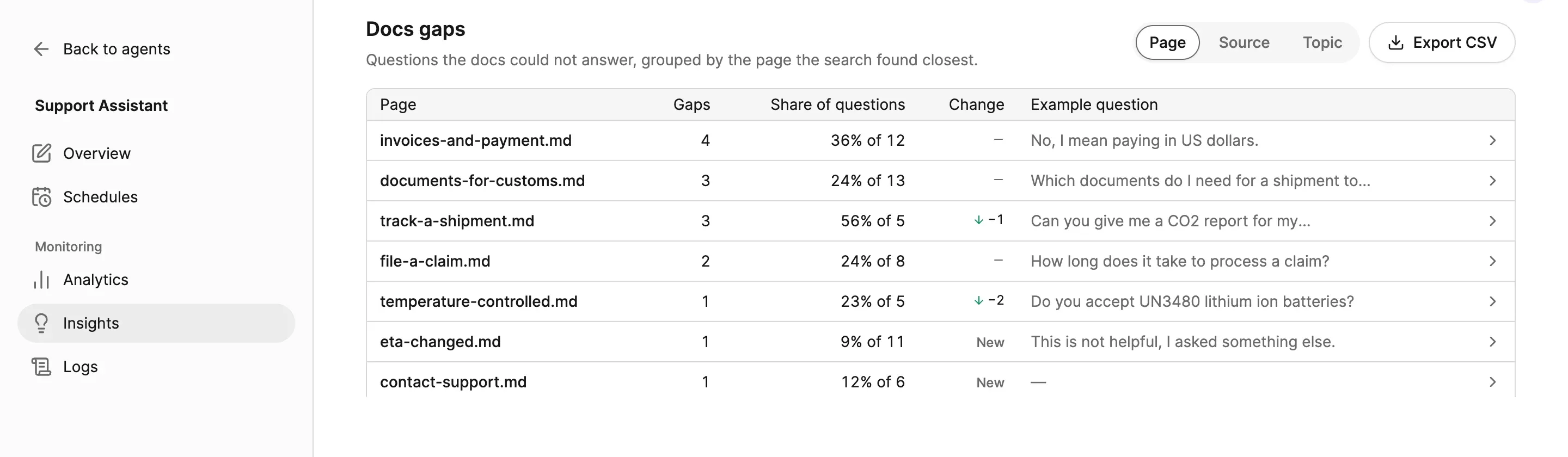
Docs gaps lists the questions your documents couldn't answer, grouped by the page the search came closest to, by source or by topic. Each row shows how many gaps there were, their share of the questions, the change since the previous period and an example question.
Open a row for more examples and jump to the conversations in Logs, or export the table as CSV for the people who write the docs. Agent owners can get a weekly docs-gap summary as a notification.
group by page · source · topic · change · example question · export csv
Answered, goal met, frustrated, asked for a person
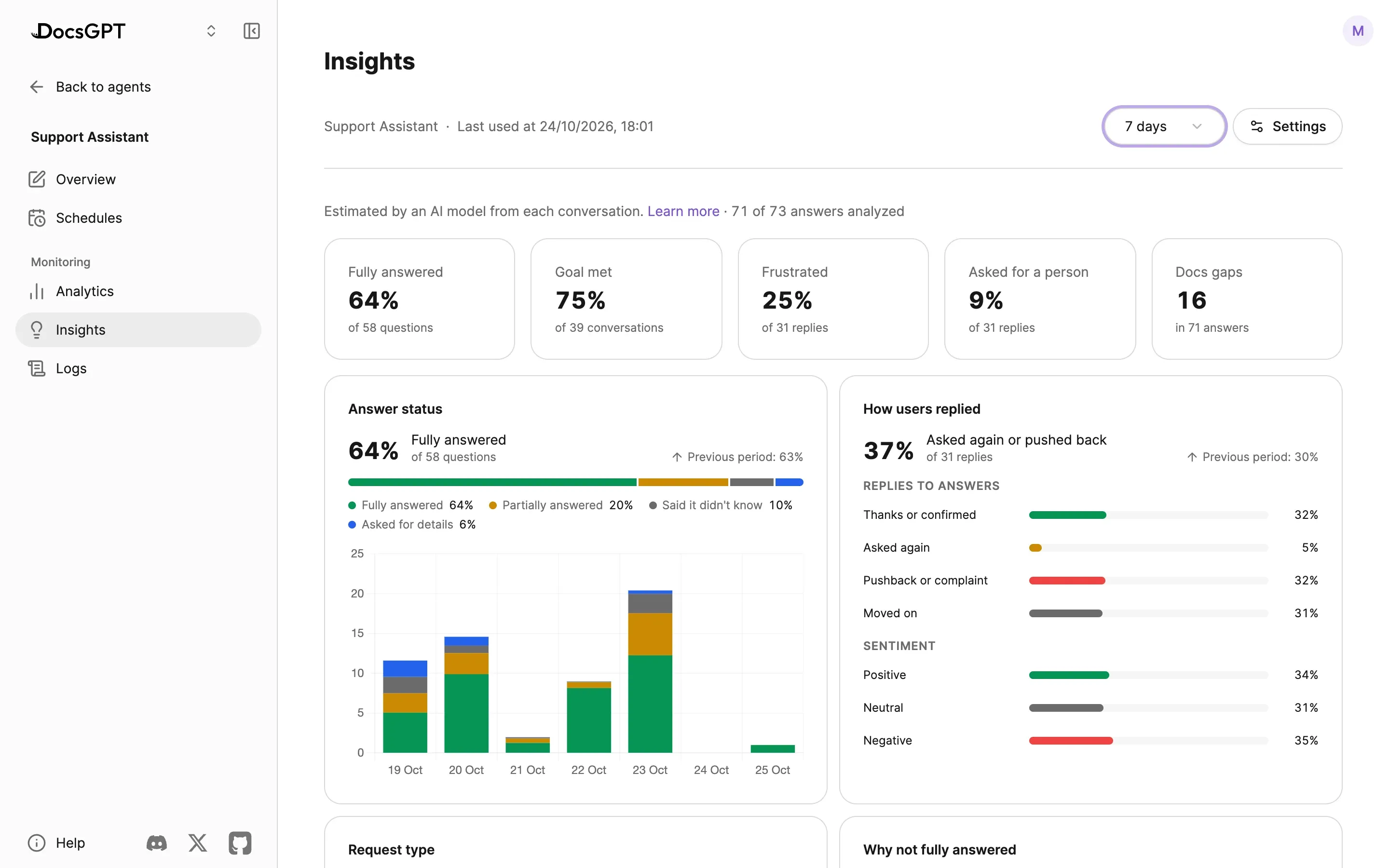
Five headline figures tell you how an assistant is doing without reading a single transcript, and the panels under them show why: how questions were answered, how people replied, why answers fell short, what kind of request it was and which topics come up.
Each figure sits beside the previous period, so a fix to the docs shows up as a change you can point to. Figures are estimates from the model's labels and appear once there is enough traffic behind them.
Tiles and panels
- Fully answered
- answers that fully addressed the question
- Goal met
- conversations where the person got what they came for
- Frustrated
- replies that show clear frustration
- Asked for a person
- replies asking for a person or a ticket
- Docs gaps
- answers that fell short because the docs didn't have it
- Answer status
- fully · partially · said it didn't know · asked for details
- How users replied
- thanks · asked again · pushback · moved on, or sentiment
- Why not fully answered
- docs gap · out of scope · feature request · needs staff
- Request type
- troubleshooting · how-to · fact lookup · comparison …
- Topics
- from the agent's source folders, plus your own
For every agent, widget and workflow
Every agent has Monitoring: Analytics for volume and tokens, Insights for answer quality, and Logs for each conversation. An agent's Insights cover all of its conversations, whether they came from the app, a shared link, the API or the chat widget on your docs site.
Your own account has Insights too, across the agents you use, and workflows have an Insights tab in the builder. Topics start from the folders of the agent's sources, and you can add your own, such as "Billing" or "Bug report".
monitoring · analytics · insights · logs · per agent · per account · workflows · topics
Labelled by a small model of our own
arc-decide is Arc53's decision model. It doesn't write text: it answers yes/no and multiple-choice questions about a conversation, with a probability for each answer, which is what makes it fast enough to label every conversation.
It was trained on public datasets, synthetic conversations and is published under the MIT licence. The same model scores prompt injection and the relevance of retrieved passages. Labelling happens in the background, a few minutes after each conversation, never while someone is waiting for an answer.
arc-decide · 0.4B · mit · cpu or gpu · background labelling
- 01Conversationsapp · widget · api
- 02arc-decidedecision model · in your deployment
- 03Labelsanswered · replies · reasons · topics
- 04Insightstiles · panels · docs gaps
Text version
Stored conversations from the app, the widget and the API are read in the background by arc-decide, DocsGPT's decision model, inside your deployment. It labels each answer and reply: answered or not, how the person replied, why an answer fell short, the topic. Insights add the labels up into tiles, panels and the docs-gap table.
How it runs privately
The decision model runs inside DocsGPT, on CPU or a GPU, and reads conversations where they are stored. Labels hold no text, are visible to the same people as the agent's logs, and are removed with the conversation.
Four deployment postures, one code base. Compare deployment options →
Inside your network
- arc-decide decision model
- background labelling
- labels in postgresql
- insights · logs
managed · on-premises · air-gapped
Cloud
Arc53 runs the decision model with the rest of DocsGPT Cloud; Insights are on for every agent.
Air-gapped
The same model from a local copy, with no network: Insights work fully air-gapped.
Example
A logistics company puts a help-centre agent behind the chat widget on its customer docs. A week later, its Insights show most questions fully answered, a rise in people asking for a person, and the top docs gap grouped under the customs page: "Which documents do I need for a shipment to Norway?"
The support lead adds a section on non-EU shipments, the gap falls the next week, and the same agent keeps answering in the widget, the app and the API.
Next: tune retrieval with Test retrieval and Relevance · the chat widget · prompt-injection scanning · for AI product builders · deployment options · pricing · contact
Frequently asked questions
What does DocsGPT Insights show?
- How well an assistant answers and how people react: the share of questions fully answered, conversations where the person reached their goal, replies that show frustration or ask for a person, why answers fell short, what people ask about, and a table of documentation gaps. Every figure sits beside the same figure for the previous period.
How does it find documentation gaps?
- It looks for answers that fell short because the documents don't cover the question, or the search didn't find the page, and groups them under the page the search came closest to, its source or a topic. Each row has an example question, so the gap is easy to act on; open the conversations in Logs or export the table as CSV.
Does it send our conversations anywhere?
- No. The decision model runs inside your DocsGPT deployment and reads the stored conversations there; on DocsGPT Cloud it runs on Arc53's infrastructure with the rest of the service. Labels hold no text, live apart from the conversation, and are removed with it. See deployment options.
Do I need a GPU?
- No. Conversations are labelled in the background, a few minutes after they happen, never in the path of an answer, so a CPU is enough. The same model can run on a GPU when you want more of it. Read about the decision model.
Can I see Insights across the whole organisation?
- Insights are per agent, covering every conversation with that agent, and per account, covering your own. Organisation-wide spend and usage are in Admin › Usage.
See DocsGPT on your documents
A 30-minute demo on your use case, or a free on-premises review with an engineer.