Most RAG products put small numbers after their sentences. Click one and you usually get a file name, or the first page of a long PDF, and you're back to searching, this time to check the assistant. A citation that costs more time than the search it replaced is decoration.
DocsGPT 1.0 rebuilt the parts of the chat that decide whether you can trust an answer without redoing the work: the citation, the record of what the agent did, the files you attach, and the retrieval underneath. The release post gave them one paragraph. Here each gets a section.
A Citation Opens the Passage, Not the File
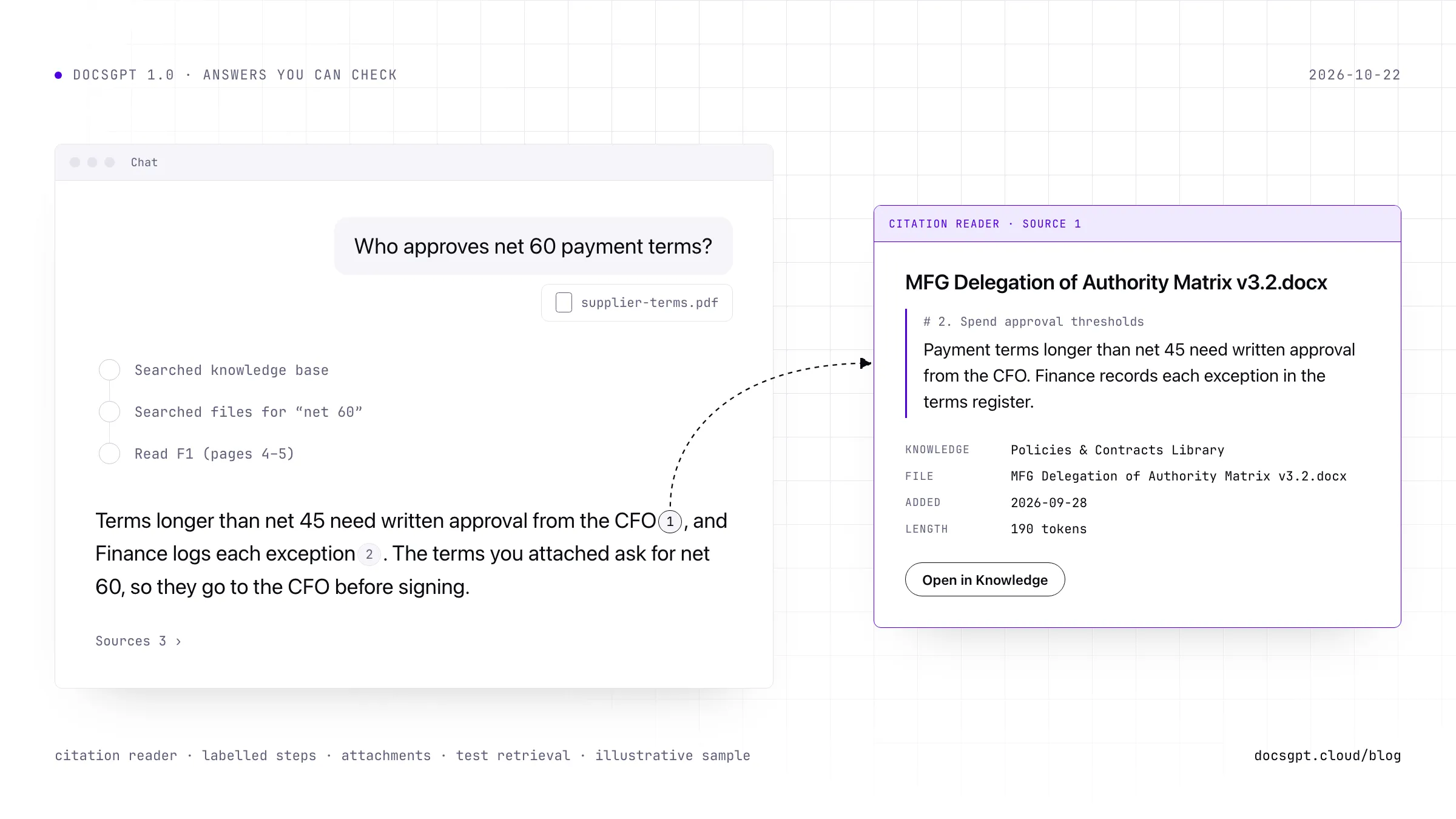
When an answer has sources, DocsGPT numbers them before the model sees them. The documents sent with the question are 1, 2, 3, and every search the agent runs during the answer continues the same numbering. So when the answer writes [2], the number points at one chunk of one document, and the chat turns it into a pill.
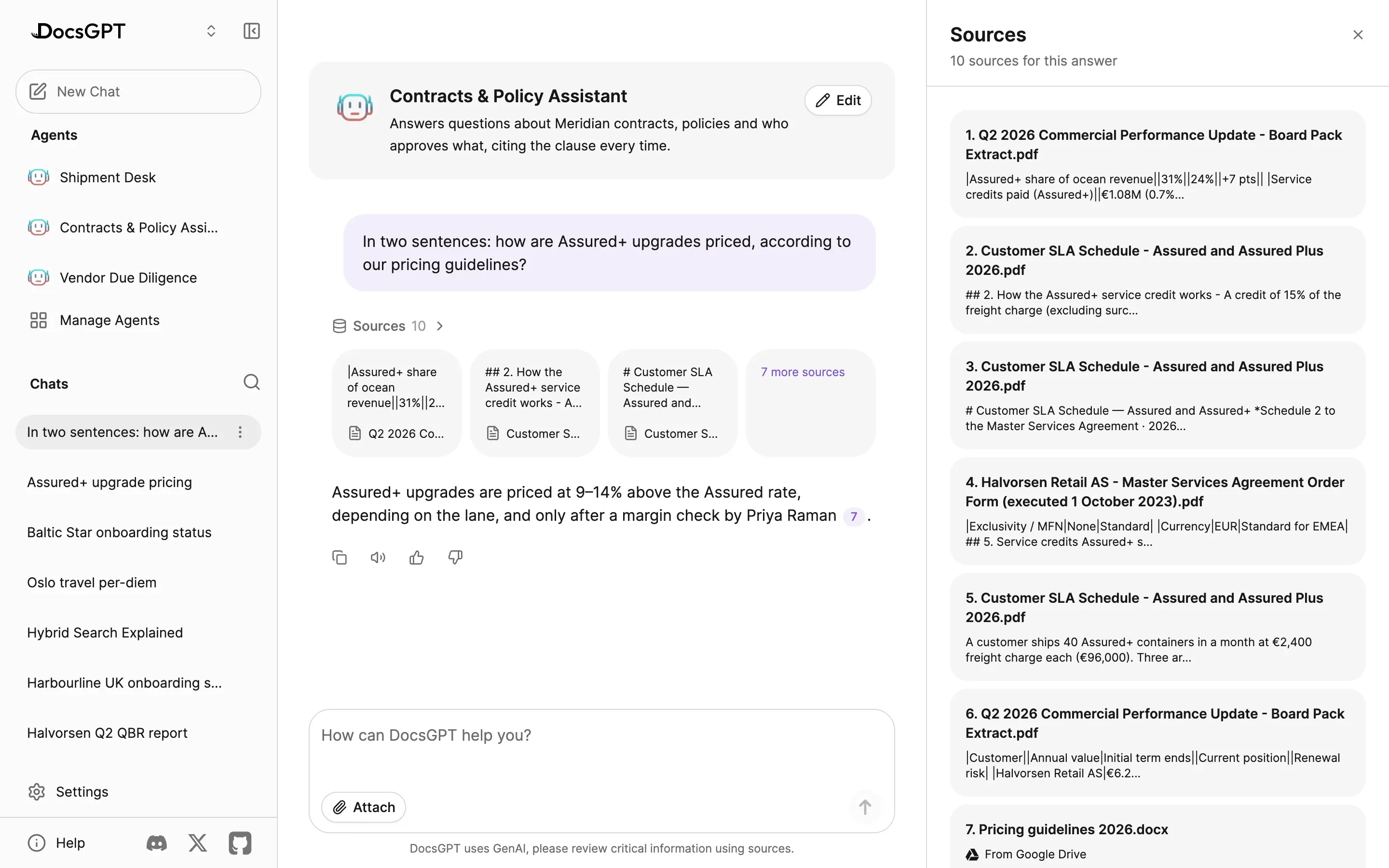
Click it and the citation reader opens beside the chat. It fetches the full passage by the key retrieval tagged it with, rather than the short excerpt saved with the answer, and lists what's known about it: the knowledge source, the file (or the wiki page, or the address of a web page), when it was added and its length in tokens. Open in Knowledge lands on that chunk inside its file, so you can read the paragraph before it and the one after. The Sources row under the question lists every passage the answer received, cited or not, and a file synced through a connector says where it lives: "From Google Drive".
Documents change after answers are written, and the reader says so. If the source was edited or re-indexed since, it tells you the passage is gone and shows the excerpt saved with the answer; if you've lost access, it says that instead. We'd rather show you the gap than quietly show you different text.
Your own prompts get citations too. The built-in prompts and any plain-text prompt get the citation rules automatically, and a template prompt gets them from one line, {{ source.citation_rules }}, which renders nothing when a turn has no sources. Citations in the docs lists which prompt kinds get them.
Formulas are checkable now too. Answers render maths with KaTeX, chemistry included, and dollar amounts stay text, so "$40 per pallet" never turns into an equation.
Why it matters: checking an answer should take one click and a paragraph of reading. Once it takes a search, people stop checking.
Every Step Labelled, in the Order It Happened
An agent that searched two sources, read a wiki page and filed a ticket used to hand you its answer under a stack of tool calls. In 1.0 the answer renders in the order it streamed, text, reasoning and tool calls interleaved, so each step sits next to the sentence it led to.
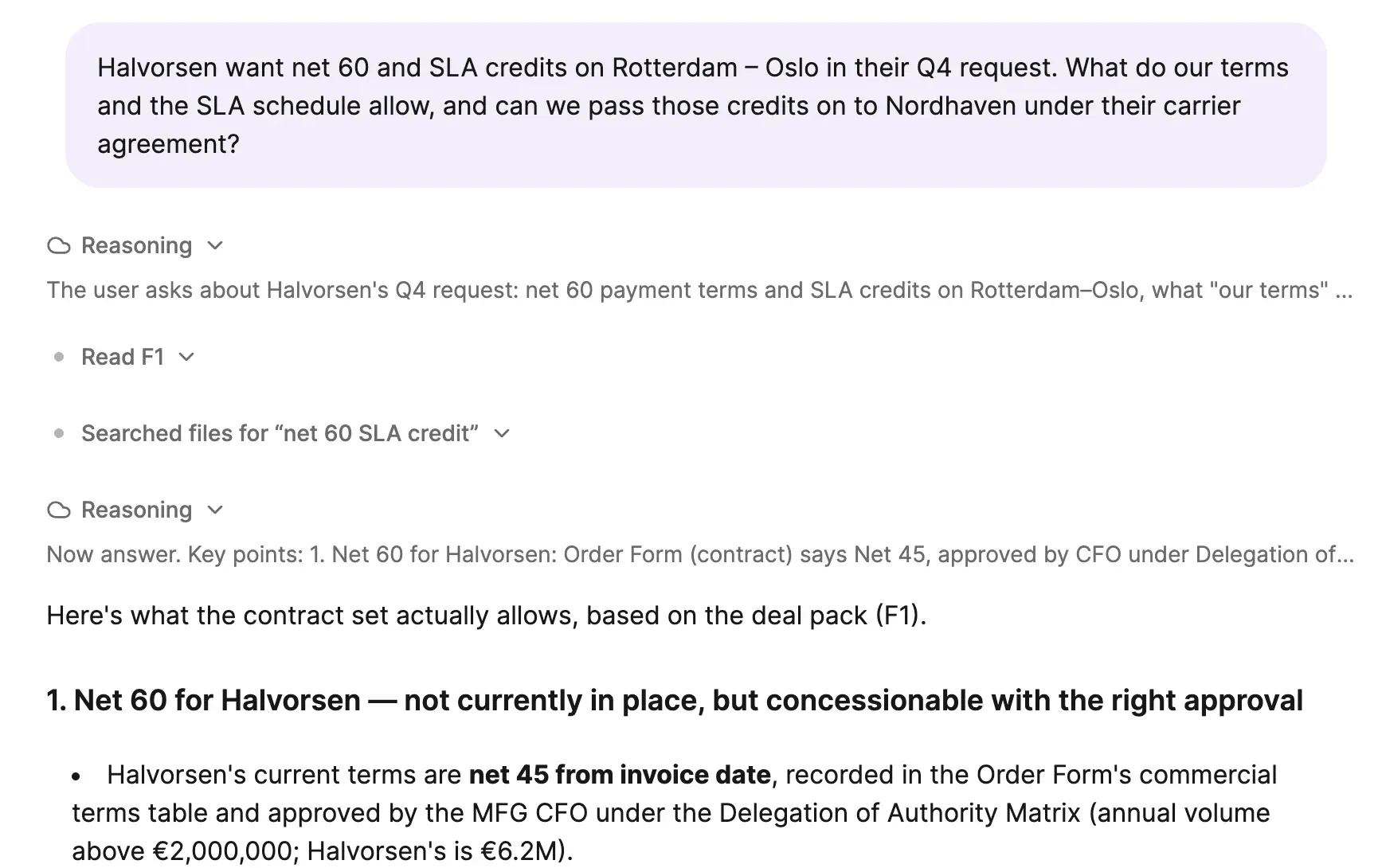
Each step names what it did and to what: "Searched Notion", "Used Linear: create issue", "Read wiki page /sales/pricing.md". Three or more calls in a row fold into one step group showing their tool icons, a count of steps and, in red, how many failed. Open a row and you see the arguments the agent sent and the response it got back.
The labels also tell you when something didn't happen. A call the server refused stays on the message as a failed call with its reason, even after a reload. A call still waiting for your approval when you moved on is marked not run, under its tool and action name rather than a past tense that claims it sent something. Where those Notion and Linear actions come from, and who approves a write, is the subject of the connectors post.
Why it matters: an answer is only as good as the steps behind it, and you can't question a step you never saw.
Long Attachments, Read to the Last Page
Attaching a long contract used to fail quietly. DocsGPT stored the start of its text for the prompt and the rest wasn't there, so a question about a clause near the end got an answer from whatever it had.
In 1.0 only what fits goes into the prompt, and the rest stays within reach. The worker keeps the whole extracted text next to the original file, and the model gets a short list of the conversation's files. If it takes tools, it can search across all of them and read a PDF by page, and those steps get labels like any other: "Searched files for "net 60"", "Read F3 (pages 2–4)". A zip unpacks into one attachment per file.
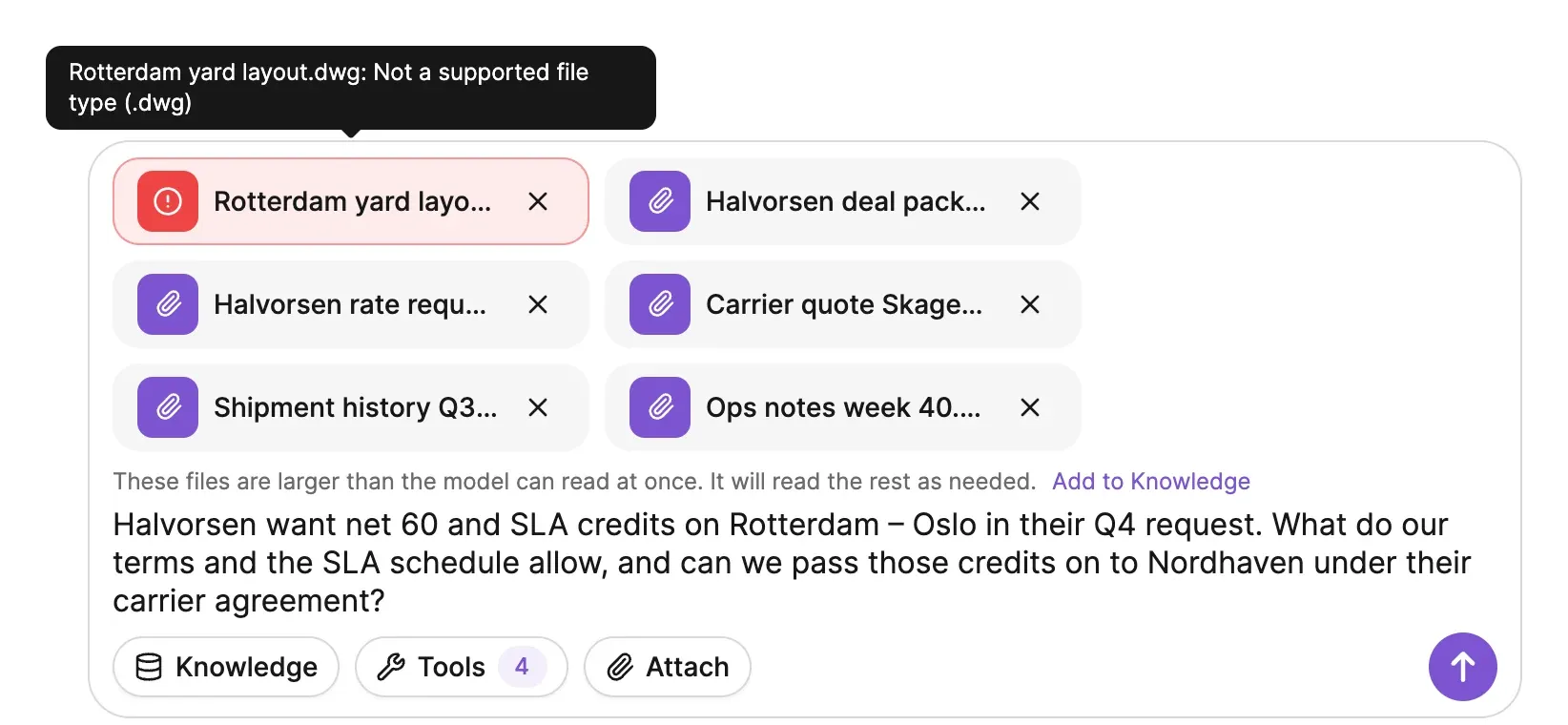
When the files are more than the model can read at once, a line under them says so and offers Add to Knowledge. One click turns them into a knowledge source, indexes it like any upload and selects it for the chat, so the question runs against real retrieval with citations rather than a truncated paste. If a message does overflow the model's context, the error offers the same button, and the retry goes out against the new source instead of failing the same way twice.
A file that fails no longer holds your question hostage. It used to block Send until you found the chip and removed it. Now a failed file is dropped when you send, the rest of the message goes, and hovering the failed chip tells you why, a file type it can't read for example.
Why it matters: the long document is usually the one you most need checked.
Test Retrieval Before Anyone Relies on It
In our experience most bad answers are retrieval problems wearing a model's voice: a fluent paragraph written from the wrong chunks, or from the right chunk crowded out by its neighbours.
So 1.0 changes the default first. Chats without an agent, and agents that don't set a count, now retrieve 6 chunks per search instead of 2. The count is a total split across an agent's sources, so the old default gave an agent with two sources one chunk from each, and its answers changed with whichever chunk won. Agents and sources that store a count keep it, and a small local model with a short context can be given fewer per source.
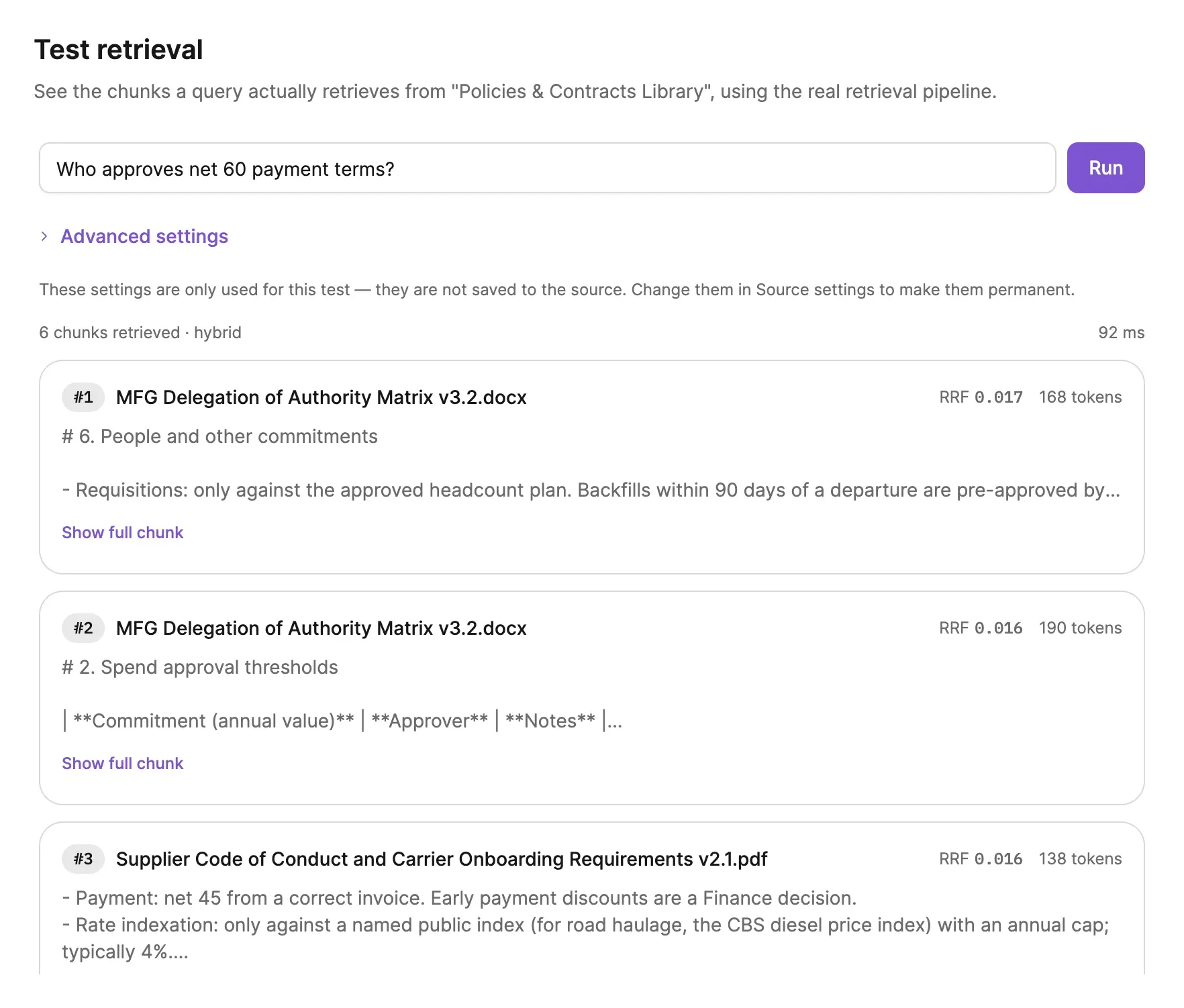
Then you can look at retrieval without asking a chat. Test retrieval, on any source in Knowledge, runs a question through the same pipeline an answer uses and lists the chunks in rank order with their file, score and token count, plus the retriever and how long it took. Try a different retriever, chunk count or score threshold for the test; nothing is saved until you change the source's settings. Scores are labelled for what they are: similarity, distance on FAISS, or RRF for hybrid, which only orders one query's results. Testing retrieval has the details.
Why it matters: you see what a question retrieves before a colleague relies on the answer.
Fix the Chunk, Then Read the Trace
When the test turns up a bad chunk, open it. Every chunk in Knowledge now shows its token count, and anyone who can edit the source can edit, add or delete chunks in place. A sync replaces a synced source's content, so fix those in the document itself.
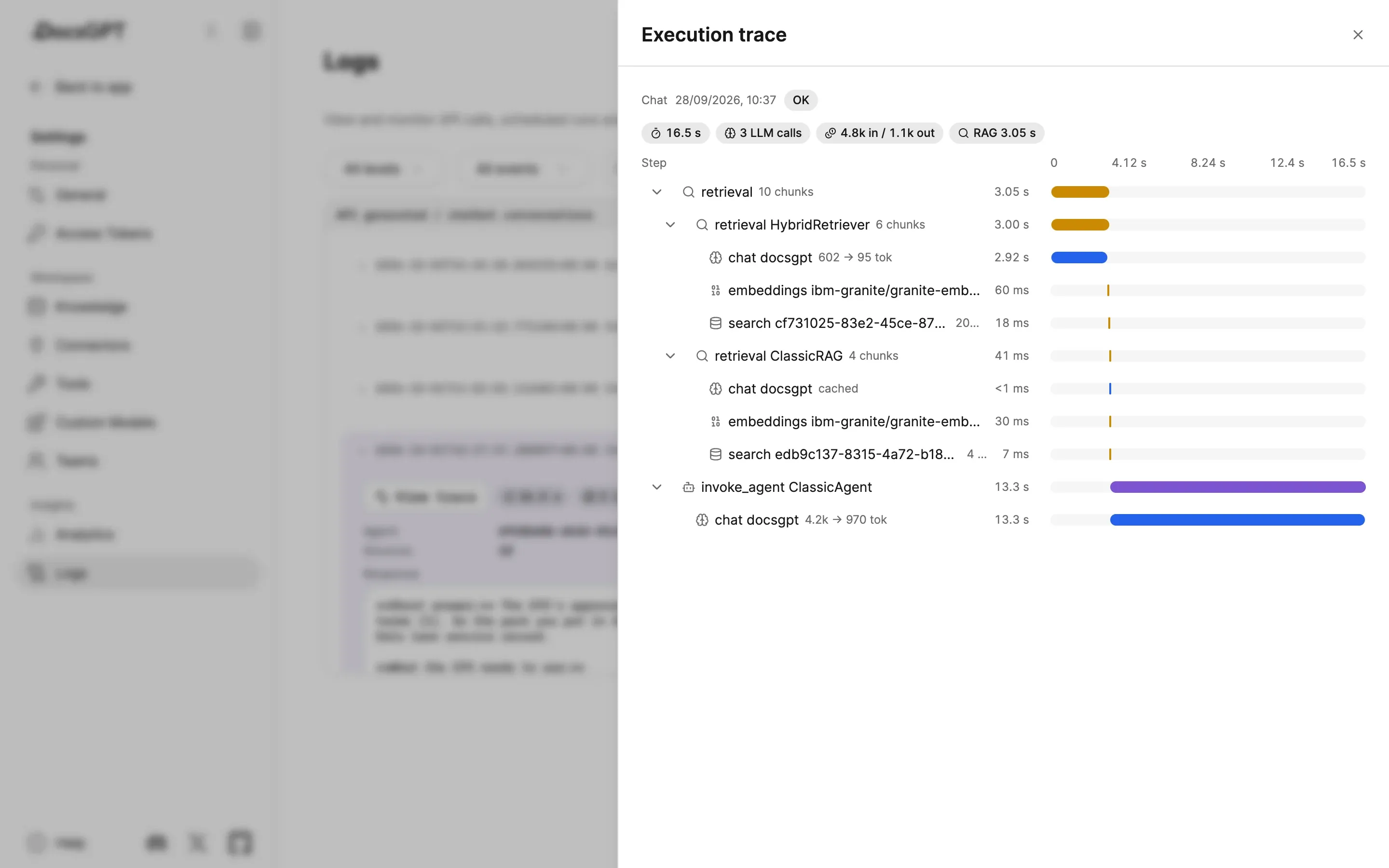
After the answer, the record is in Logs. Open a chat's entry, choose View trace, and retrieval has its own spans in the waterfall: each retriever with its chunk count and time, with the embedding call and vector search beneath it. Click a search to see the query, the top score and the chunks it returned. The same spans go out over OpenTelemetry, next to the model call that followed them. Execution traces lists the span types.
Why it matters: when an answer is wrong, the trace tells you whether retrieval or the model is to blame, and that tells you what to fix.
Try It on a Document You Know
Pick a source you know well and a question you could answer blindfolded. Run it through Test retrieval, then ask it in chat and click the citation. If the passage that opens isn't the one you'd have picked, you've found the setting to change. Search & Retrieval covers the retrievers and per-source settings, and Deploy compares where DocsGPT can run. Next in this series: roles, quotas and the activity log.