DocsGPT 1.1 showed you what your agents do and which questions your documents fail to answer. Then more people at the same company started building agents, and a different problem showed up. An agent belonged to whoever made it, along with its knowledge, its tools and its prompt. When that person changed team or left, the helpdesk agent half the office relied on went with them, and nobody else could fix it.
DocsGPT 1.2 is about building agents together. Team workspaces give agents, knowledge, tools and prompts an owner that outlasts any one person, in one folder tree with roles. Draft with DocsGPT turns a sentence into a filled-in agent you review before saving, and later proposes fixes from the gaps Insights found. MCP Apps draw live, editable views inside the answer. And a Loop node, retries and syncs that touch only what changed make long and repeated work finish.
We merged 120 pull requests in the 30 days since 1.1, from 14 first-time contributors among others. If you run DocsGPT today, the upgrade notes are at the end.
Team Workspaces: Agents That Outlast the Person Who Built Them
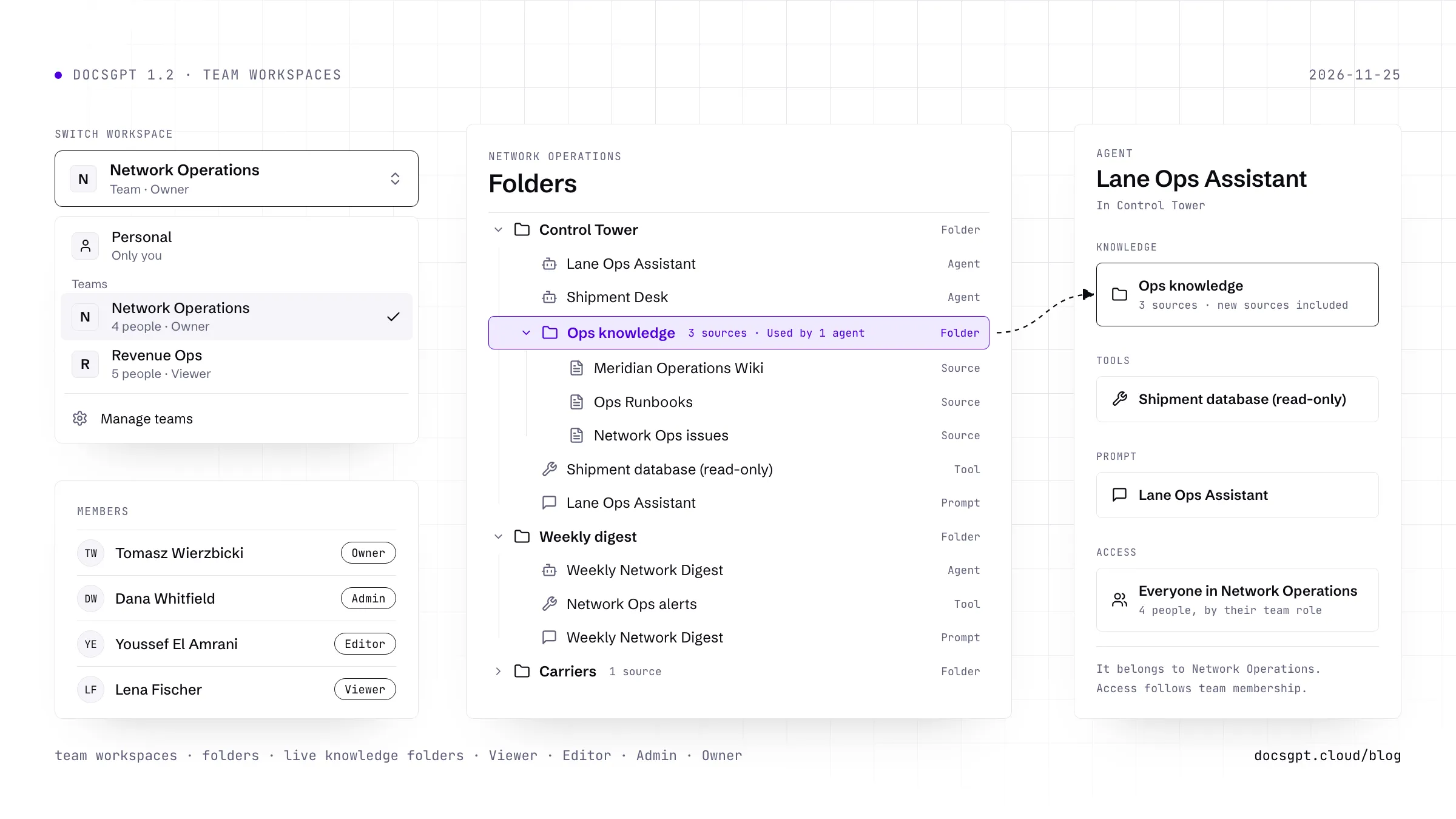
Every account now has a personal workspace, and every team has a team workspace. Pick one in the switcher and everything follows it: the lists of agents and knowledge, your chats, Activity, pins and every picker. Work in a team workspace belongs to the team. Its author can move on and the agent keeps answering, with the people who can change it named on the team.
Inside a workspace, agents, knowledge, tools and prompts share one folder tree. Folders do more than tidy. Point an agent, a workflow step or a chat at a knowledge folder and it uses the whole folder, so a policy filed there next month reaches the agent without anyone editing it.
Each member has a role: Viewer, Editor, Admin or Owner. The role is checked the same way in the app, over the API, inside workflows and in runs that happen at night with nobody signed in. Moving something into a team shows the whole plan before anything moves: what goes with it, who gains or loses access, who will own it, and which models get swapped for ones the team has. Teams can share with each other, and a team decides who may open its work to people outside it.
Teams can also connect accounts and add custom models for everyone, while tools that act as a person still use that person's own sign-in. Every run is charged to someone (the person chatting, or whoever set up the schedule), so the team usage report adds up. A chat stays private to the person who started it, even in a team, while the agent's Logs still record the run for the people who look after it.
Why it matters: the agents your company depends on stop being one person's side project, and it's clear who may change them.
Draft With DocsGPT: Describe the Agent, Review the Form
Building a good agent meant knowing which sources to attach, which tools to allow, how to write the prompt and where to set limits. Now you start with a sentence. Open New agent, describe what you want ("a helpdesk agent that answers staff questions from our HR policies") or pick a starting point such as a website chat for customers, an internal helpdesk or a research assistant. DocsGPT works through the form in four steps: Basics, Knowledge, Prompt and starters, and Limits and safety. Where your description leaves a gap it asks a short round of questions, and where it already says enough, several steps fill in at once.
Every field it fills is marked as drafted and has its own undo. It proposes knowledge folders as well as single sources. And it never publishes or deletes anything: the agent is saved when you press Save Draft or Publish, and not before.
The same panel improves agents you already have. Press Improve the agent on a docs gap in Insights or on a flagged conversation in Logs, or Improve on the agent's form, and it reads the agent's conversations first. Each fix it proposes names the gap and quotes the question it rests on, and when the real problem is a missing document, it names the page your docs lack instead of bending the prompt around it. Prompts get the same help: Write drafts a new one, and Review checks yours against a checklist that includes the rules DocsGPT itself adds.
Agents can now ask you, too. When a request is ambiguous, an agent in the app can pause with up to three short questions you answer by picking an option or typing, or skip with Just answer. If you've walked away, the chat waits under Activity › Now as Waiting for your answer.
DocsGPT's own jobs (drafting, building knowledge graphs, checking monitors) can run on a separate task model, so you can give them a cheaper or faster model than the one your users chat with.
Why it matters: a working first draft of an agent from one sentence, and nothing is saved until you say so.
MCP Apps: Interactive Views Inside the Answer
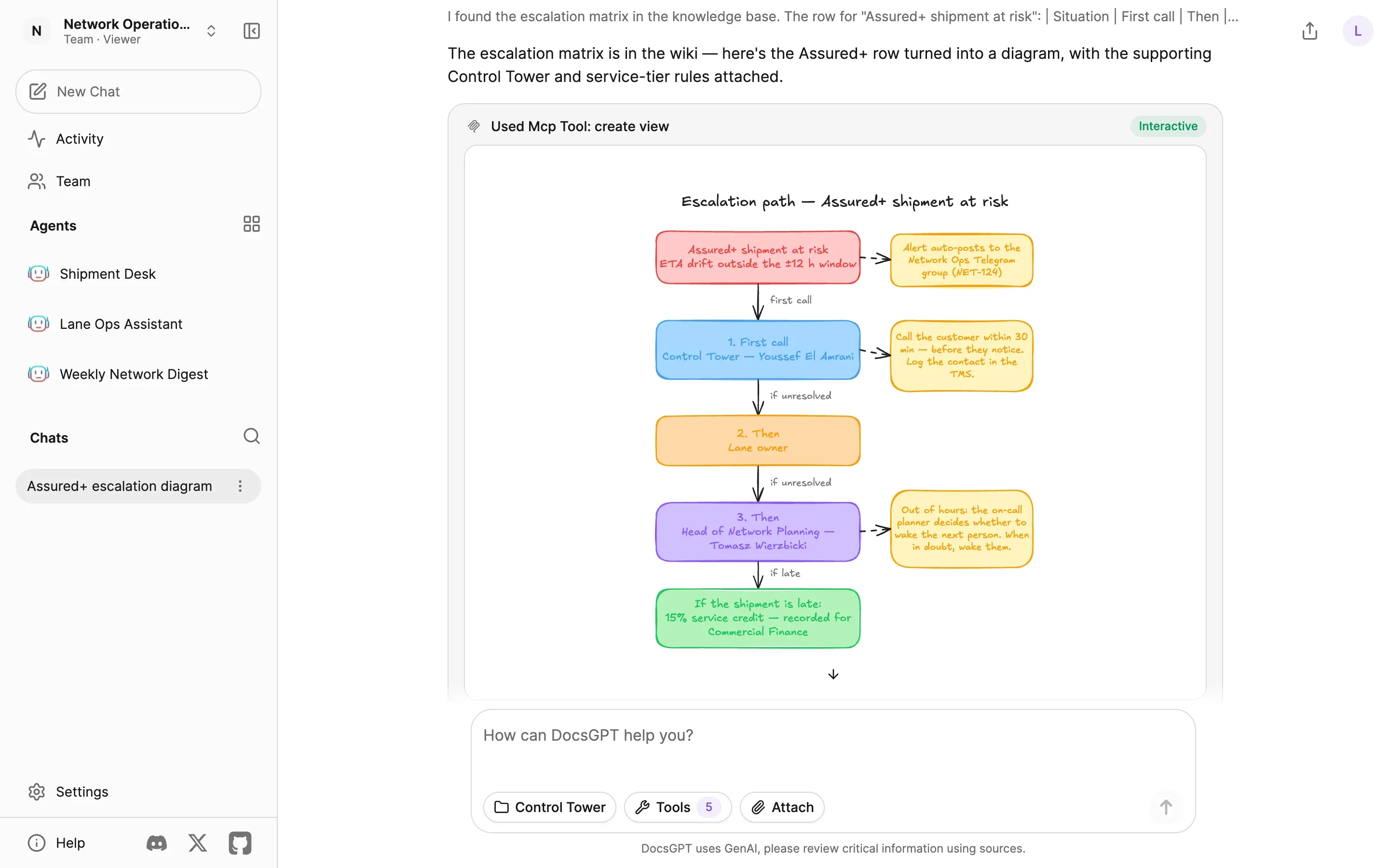
Some MCP servers now ship their own interface along with their tools. Ask Excalidraw for a diagram and DocsGPT draws the server's view live inside the answer, where you can work on it, instead of describing what it would have drawn. This follows the open MCP Apps standard, so any server that ships MCP Apps views renders the same way. Views run in a sandbox, and a tool that needs approval asks first.
Approvals got easier at the same time. When one answer needs several tool calls approved, DocsGPT holds them together and Approve all settles them in one click.
The connector catalogue grows with presets for Excalidraw, Canva, Supabase, Cloudflare and Twelve Data, all five contributed by the community.
Why it matters: the diagram or the board arrives as something you can work on, next to the sources it came from.
Built to Finish: Loops, Retries and Syncs That Do Less
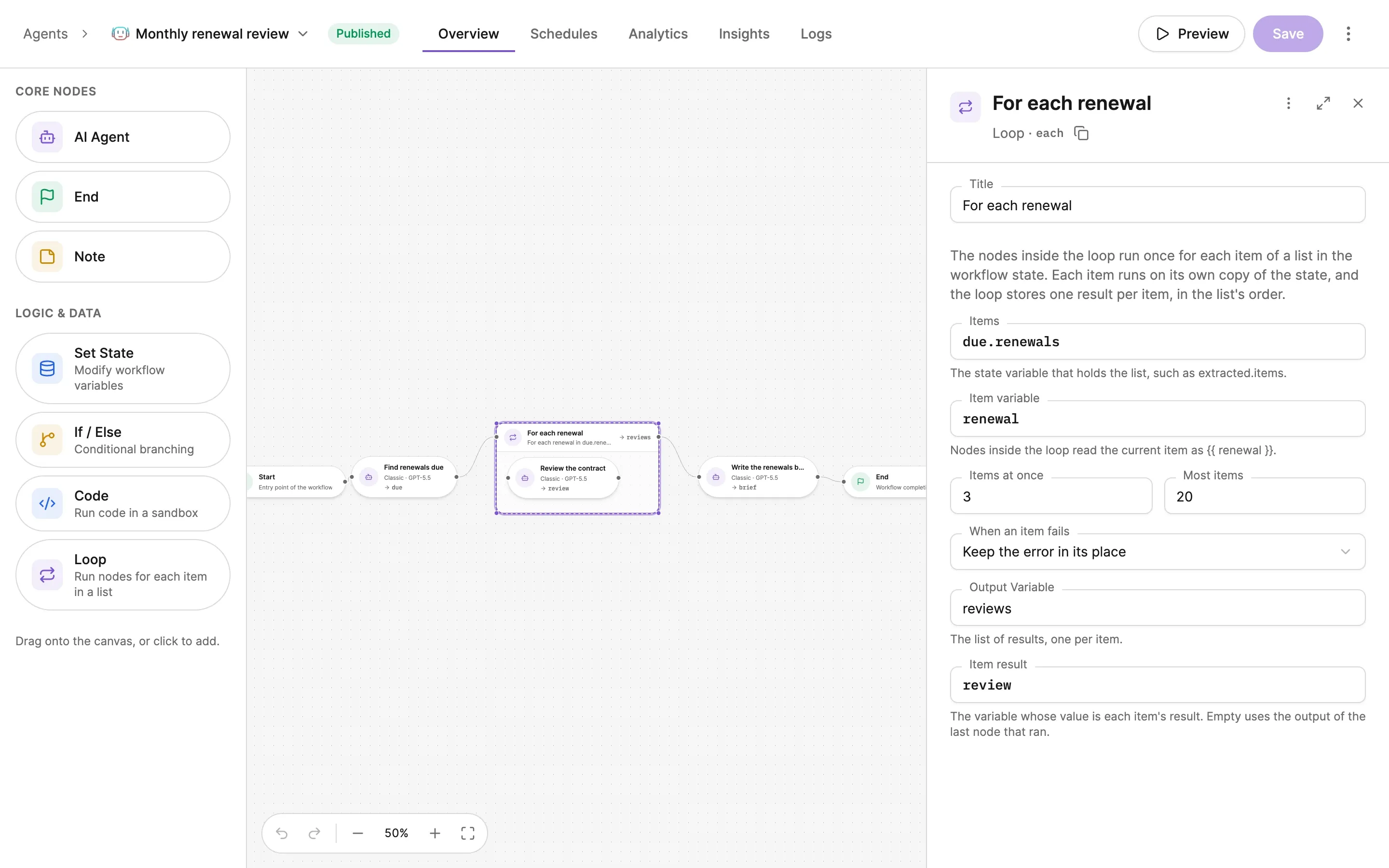
Workflows had no way to repeat a step over a list. To review twelve contracts you built twelve copies of a node, each behind an "is there an item 12?" condition. The new Loop node runs its steps once per item, a few at a time, and returns the results in the order the items came in. You decide whether one failed item stops the loop, is skipped, or is collected with the rest.
Agent and code nodes can now retry when a model or the sandbox fails for a moment, instead of failing the run. Agent nodes can cite and quote documents by line number, and a finished run's status, result and files can be read over the API with a personal access token.
The same thinking runs through knowledge. Sources from Google Drive, SharePoint and OneDrive and Confluence now compare their files with what DocsGPT already holds and only touch what changed. New and edited files are embedded. Moved and renamed files keep what they had, with only their location updated. Files that are deleted, or taken out of the selection, lose their passages. A file that can't be read is retried on its own at the next sync, without a full re-sync, and the source has a Try again now button. OCR slows down when the provider says it's busy, then picks up from the pages it hadn't read. From the command line, docsgpt-cli sources upload --sync uploads only the files a source is missing.
Long jobs got the same care. An ingest that stalls resumes from where it stopped, a long agent run saves its progress in rounds instead of losing it to a time limit, and a reasoning model that keeps thinking without ever starting its answer hands over to your fallback model.
Why it matters: renaming a folder in a big Drive doesn't trigger a full re-embed, and a job over 40 items needs one node, not 40.
Text version
A synced source from Google Drive, SharePoint and OneDrive, or Confluence lists its files, and DocsGPT compares that list with what it already has. Each file then takes one of four paths. New and changed files, highlighted, are re-embedded. Moved or renamed files keep their chunks, and only their metadata is updated. Deleted files have their chunks removed. A file that failed is retried on its own at the next sync, and the source has a Try again now button.
Hardening You Don't See
Most of the security work in 1.2 shows up only when someone checks:
- An agent's API key can be limited to the websites you allow, on every route that accepts it. This came from the community, thanks to @addu2612.
- Self-hosted installs can reach chosen internal services, while cloud metadata addresses stay blocked whatever is allowed.
- Behind a proxy or Cloudflare, the audit log now records the real client address.
- Release files carry signed SLSA provenance, the project publishes its OpenSSF Scorecard, the backend is fuzzed continuously, and every build action, container image and package install is pinned by hash.
If you're reviewing DocsGPT for your company, Security has the rest, and our post on the GitHub Secure Open Source Fund covers how this work started.
Also in 1.2
- A new chat start page: instead of four fixed examples, suggestions built from your own sources, connected services and last chat.
- Starter questions on agents, shown in the agent's chat and on its public link.
- Tools, Knowledge, Prompts and Connectors share one design, and every item says which agents use it, so deleting one tells you what would break.
- Parent-child retrieval now sends the model the larger parent passage, thanks to @vishnup102002.
- Logs show what each trace cost in model usage.
- An agent's older turns are summarised once its history passes a limit you set per agent.
- The personal access token tool can call every endpoint the token allows.
- Schedules tell you when a recurring one pauses itself.
- Parsers got better at HTML, CSV from European Excel exports, Markdown, tables with merged cells and old
.xlsworkbooks, much of it from the community. - The docs moved to a new site with interactive pages for every REST endpoint.
Thank you to everyone who contributed code to this release, among them @Soumava-221B, @NamanChaddha, @addu2612, @puri-adityakumar, @MannXo, @YongxinFu, @muditagrawal2007, @Avi112005, @cr-sbarbouche, @PratikPawar1401, @Shivam040, @praann07, @tanishqbaweja and @vishnup102002, who sent their first pull requests to DocsGPT, and @L4XB, @simpleqt, @SUJALSPATEL and @sccalabr, who came back with more.
Upgrading From 1.1
Read Upgrading to 1.2.0 and the changelog before you pull. Six changes need attention:
- Migrations 0058 to 0068 run on start. One builds an index on the token-usage table, which holds writes to that table until it finishes.
- The
applicationimport alias is gone. Custom entry points usedocsgpt(celery -A docsgpt.app.celery,uvicorn docsgpt.asgi:asgi_app). From 0.19 or earlier, let the queue drain first or upgrade through 1.1.0.- Existing team members become Viewers in their team's workspace; team admins become Admins.
- Behind Cloudflare, or a proxy on a public address, set
TRUSTED_PROXIESorTRUST_CF_CONNECTING_IPso the audit log records the real client. Proxies on a private network need nothing.- A self-hosted ntfy server with a token needs its Server URL set on the connection.
- Chats without an agent use each source's own chunk count. Over the API, creating an agent with a
prompt_idthat isn't a prompt,default,creativeorstrictnow fails.The release on GitHub has the full list.
What's Next
Next we'll show how an agent improves itself: Insights finds the questions it can't answer, Draft with DocsGPT proposes a fix for each one, and you decide what to keep. After that, team workspaces and MCP Apps in more depth. To see how agents, workflows and sharing fit together, Agents walks through it, and Deploy compares Cloud, Managed, on-premises and air-gapped.