Individual agents are useful. But the real unlock happens when agents work together, making decisions, branching based on conditions, and executing multi-step tasks without human babysitting. That's what 0.16 is about.
DocsGPT 0.16 introduces a visual Agent Workflow Builder, expands enterprise data connectivity with Amazon S3 and SharePoint, and ships a Docling-powered parser that can OCR its way through documents most models would choke on. Whether you're a developer building internal tools or an enterprise team evaluating document AI platforms, this release gives you the building blocks for production-grade automation.
Build Multi-Step Agent Pipelines Visually
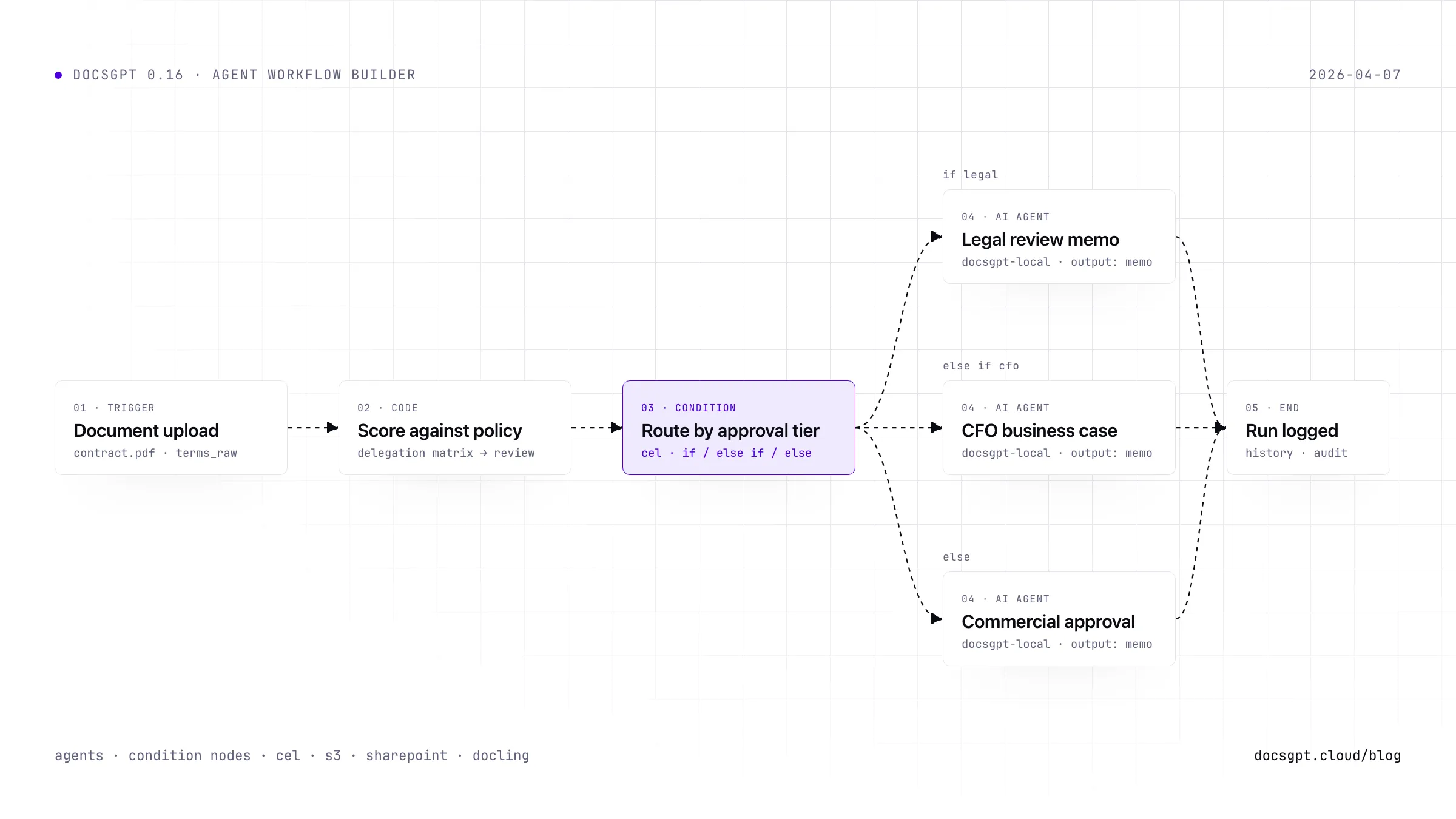
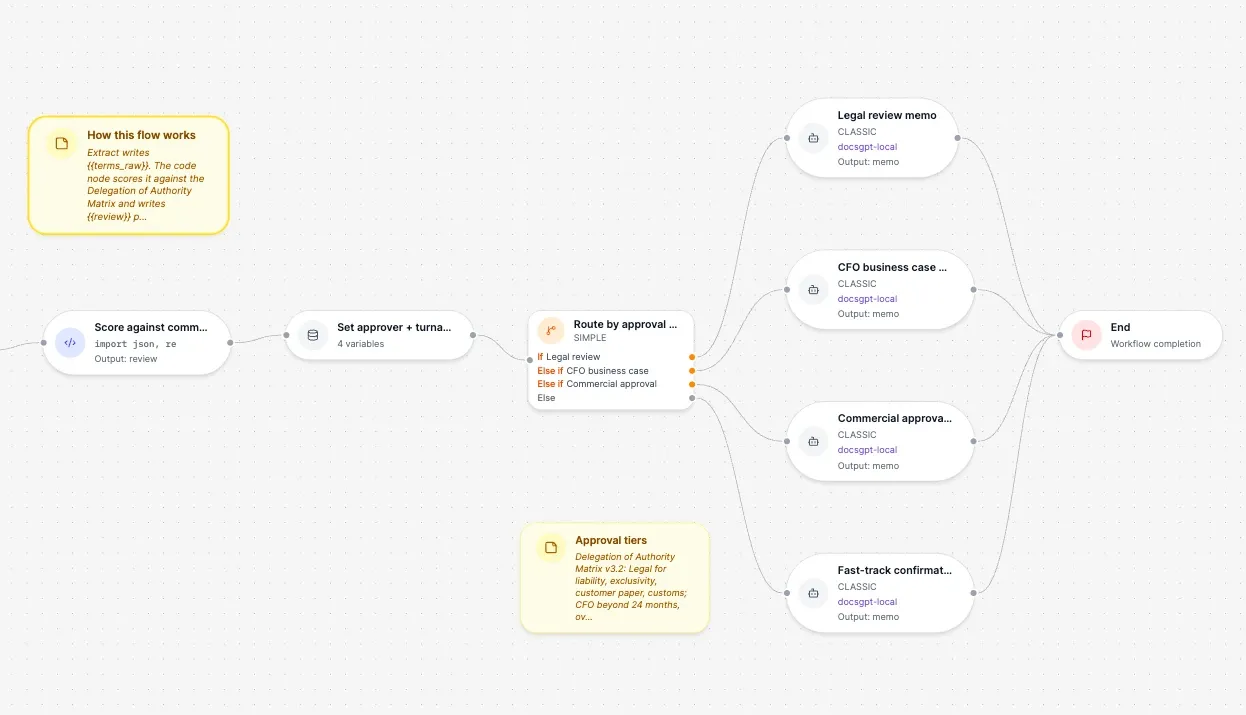
The headline feature of 0.16 is the Agent Workflow Builder, a visual interface for chaining agents into conditional, multi-step pipelines.
Previous DocsGPT versions let you configure powerful individual agents. The problem? Complex tasks rarely fit inside a single agent's scope. Summarizing a legal document, cross-referencing it against internal policy, then drafting an action plan requires coordination, not just capability.
The Workflow Builder solves this with a drag-and-drop canvas where you define agent sequences, set condition nodes using CEL (Common Expression Language) evaluation, and route outputs between steps. If step one returns a risk score above a threshold, route to the compliance agent. Otherwise, skip to the summary agent. That kind of logic is now configurable without writing code.
Why this matters: Workflows turn DocsGPT from a tool you query into a system you orchestrate. For enterprise teams, this means repeatable, auditable automation. For developers, it means less glue code.
Enterprise Data Where You Already Store It
Agents are only as good as the data they can access. 0.16 adds two major integrations that enterprise teams have been asking for.
Amazon S3 Support & Sync connects DocsGPT directly to your S3 buckets. Documents sync automatically, so when your team updates a file in S3, DocsGPT picks it up without manual re-ingestion. For organizations already built on AWS, this removes the friction of getting data into the system.
SharePoint Integration does the same for Microsoft-centric environments. If your company's knowledge lives in SharePoint (and for many enterprises, it does), DocsGPT can now pull from it directly.
Beyond new sources, we've also improved crawlers and chunk filtering across the board. Crawled content is cleaner, chunks are more precise, and the overall ingestion pipeline produces better results downstream.
Why this matters: The biggest bottleneck in document AI adoption isn't model quality. It's getting your actual data connected. S3 and SharePoint support removes that barrier for the two most common enterprise storage patterns.
Text version
Three enterprise stores on the left, Amazon S3 (access key and bucket, auto-sync), SharePoint (Entra ID and the Graph API, auto-sync) and Google Drive (OAuth2, on demand), feed one Sync step that runs on a schedule and picks up changed documents. Sync writes into the knowledge layer on the right: each store becomes its own source, passed through the improved crawlers and chunk filtering before retrieval.
Smarter Document Processing with Docling & OCR
Not every document is a clean UTF-8 text file. Scanned PDFs, image-heavy reports, and legacy documents with embedded charts have always been a pain point for document AI systems.
DocsGPT 0.16 ships the Docling parser, an advanced document processing engine with built-in OCR support for attachments. Docling extracts structured content from documents that would otherwise require manual pre-processing.
Paired with this, we've added synthetic PDF processing: when a model doesn't natively support file uploads, DocsGPT processes the PDF synthetically and feeds the extracted content to the model. No more "unsupported file type" dead ends.
The new Research Agent rounds out this pillar. It's a purpose-built agent type designed for multi-step information gathering and synthesis, the kind of task where you need to pull from multiple sources, cross-reference findings, and produce a structured output.
Why this matters: Document AI that only works on perfect inputs isn't useful in the real world. Docling and synthetic processing mean DocsGPT handles the messy documents that actually exist in enterprise environments.
- 01Scanned PDFimage-only pages · legacy report
- 02Docling parse + OCRlayout · tables · text from images
- 03Structured contentsections · tables · captions
- 04Chunksfiltered · per-source settings
- 05Agentcited answer · synthetic pdf fallback
Text version
A scanned or image-heavy PDF enters the Docling parser, which reads layout, tables and text inside images with OCR. The structured content is chunked and filtered per source, then retrieved by the agent. When a model cannot take file input, DocsGPT feeds it the extracted content instead of failing on the file type.
Organize, Stream, and Secure
Every major release carries a wave of improvements that don't make the headline but make the daily experience better.
Agents Grouped Under Folders
As agent libraries grow, flat lists become unmanageable. You can now organize agents into folder structures, making it practical to maintain dozens of specialized agents without losing track of them.
Streaming Thinking Tokens
When an agent reasons through a complex task, you can now watch it think. Streaming thinking tokens surface the model's intermediate reasoning in real time, giving you transparency into how the agent arrived at its answer.
Speech-to-Text
Voice input is now initialized in 0.16, allowing users to interact with agents through speech. Early-stage, but the foundation is in place.
Advanced Settings & Dynamic Config
New advanced settings give power users more control over agent behavior, and dynamic configuration rendering makes MCP tool setup more flexible.
Accessibility & Security
Frontend accessibility improvements make DocsGPT usable for a wider range of users. Token calculation and history counting have also been corrected for accuracy.
Novita AI Provider
Novita AI joins the list of supported model providers, expanding the range of models you can plug into your agents.
9 New Contributors Joined This Release
Open source grows through community. DocsGPT 0.16 includes contributions from 9 first-time contributors alongside the core team, spanning features, bug fixes, accessibility, and testing.
What 0.16 Means for DocsGPT
This release marks a shift in what DocsGPT is. Previous versions focused on making individual agents smarter: better prompts, better memory, better tools. 0.16 focuses on making agents work together. The Workflow Builder is the clearest expression of that direction, but it shows up everywhere, in how data flows in from S3 and SharePoint, in how Docling pre-processes documents before agents ever see them, in how folders organize growing agent libraries.
The trajectory is clear: DocsGPT is becoming an orchestration platform, not just a chat interface.
- Try DocsGPT Cloud
- Explore the Repository
- Join our Community on Discord, X and LinkedIn