DocsGPT 1.1: See What Your Agents Do and What Your Docs Miss
DocsGPT 1.1 shows the questions your docs don't answer, puts every agent run in one Activity view, and adds arc-decide, a small model of our own.
Pavel Torbin10 min readreleaseagentsknowledgeguardrails
DocsGPT 1.0 was about getting DocsGPT in front of a company: a one-line install, connectors to the tools you already use, answers you can check, and an admin panel IT would sign off on. Once it's there, it gets busy without you. Agents run on schedules at three in the morning, a widget answers customers on a docs site nobody is watching, and an assistant takes questions all day from people who almost never press thumbs up or down.
So the questions change. What are my agents doing right now, and which questions are my documents failing to answer? DocsGPT 1.1 answers both. Insights reads every conversation and shows you where answers fall short, down to the page. Activity puts every run, schedule and monitor in one place. Behind Insights sits arc-decide, a small model we trained to make yes/no calls inside your deployment. And a much better chat widget with a new Website source makes DocsGPT a proper assistant for a public docs site.
We merged more than 80 pull requests in the 17 days since 1.0, from 17 first-time contributors among others. If you run DocsGPT today, the upgrade notes are at the end.
Insights: Find What Your Docs Don't Answer
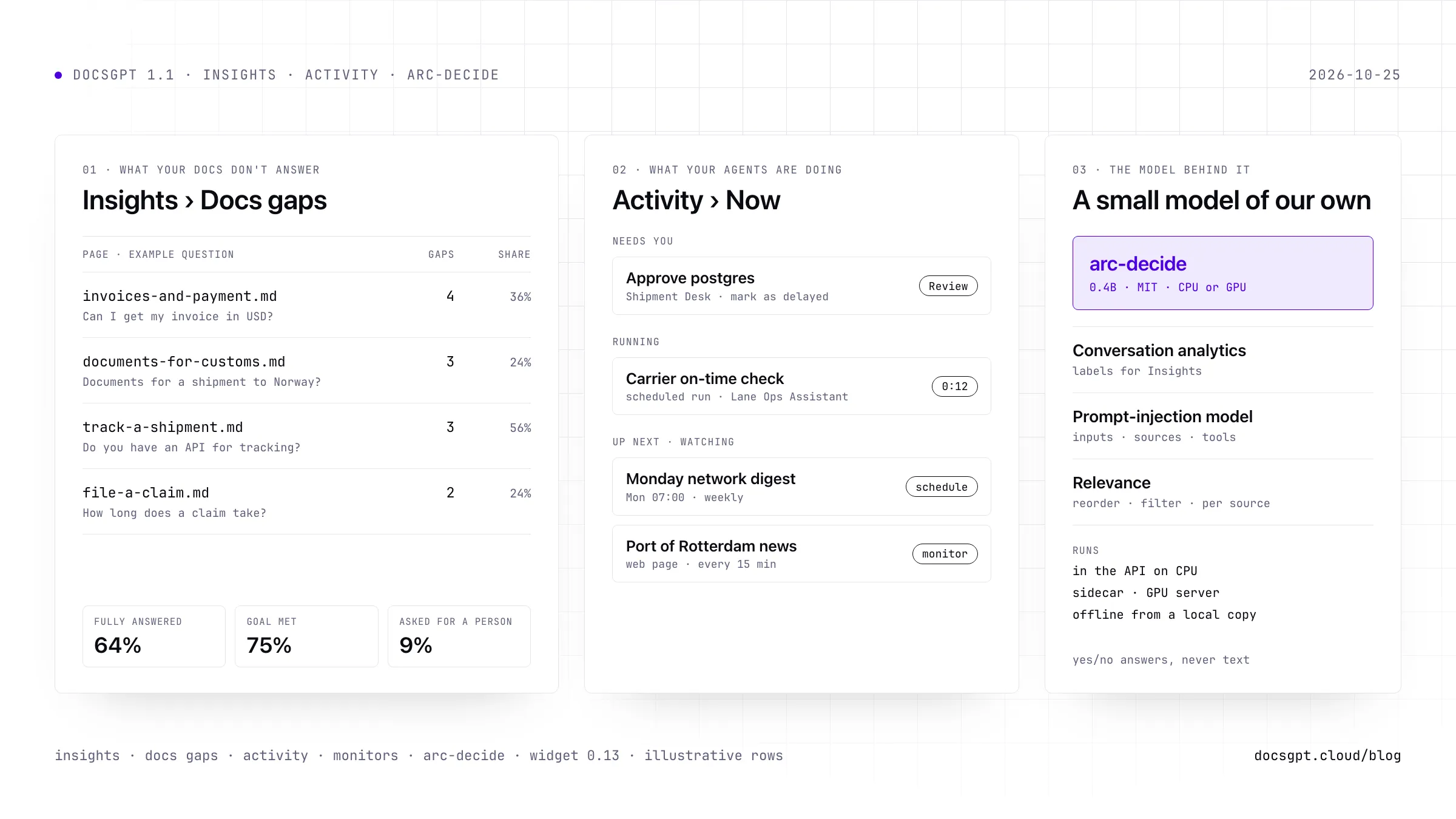
Thumbs up and down are rare. Most people who get a poor answer just leave, or ask the same thing again in other words. Insights reads the conversations themselves. For each answer it estimates whether the question was fully answered, whether the person got what they came for, and whether their reply showed frustration or asked for a person. The panels below break that down: how questions were answered, how people replied, why answers fell short, what kind of request it was and which topics come up, each next to the previous period.
The part we use most is Docs gaps. It lists the answers that fell short because the documents don't cover the question, grouped by the page the search came closest to, by source or by topic. Each row comes with an example question, so "track-a-shipment.md, 3 gaps" arrives with "Do you have an API for shipment tracking?" attached. Open a row for more examples, jump to the conversations in Logs, or export the table as CSV for whoever writes the docs. Agent owners can get a weekly docs-gap summary as a notification.
You'll find Insights under Monitoring on every agent, covering all of its traffic (the app, shared links, the API and the widget), and on your own account. Conversations are labelled in the background a few minutes after they happen, never while someone waits for an answer. Every figure is an estimate, and the Insights docs say how far to trust each label. A gap can also mean the page exists and search didn't find it; Test retrieval tells you which.
Why it matters: you learn what to write next from the questions people actually asked, without reading transcripts.
Activity: Everything Your Agents Are Doing
Agents could already run on schedules, from webhooks and inside workflows, and the assistant could keep working in the background after you closed the chat. What was missing was one place to see all of it. The Activity tab, right under New Chat, has five views:
- Now shows what needs you (an approval, say), what is running, what runs in the next 24 hours and what is being watched. A running answer can be stopped from here.
- Calendar lays out every scheduled run and knowledge sync by day, week or month, including the ones that were missed.
- History keeps finished scheduled, webhook and workflow runs, background jobs and monitor wakes for 7, 30 or 90 days.
- Schedules lists every schedule across your agents, including the ones the assistant set up in a chat.
- Monitors are things the assistant watches for you. Ask in a chat to be told when a price drops or a page changes, and a monitor checks it and picks the conversation back up when it happens.
Notifications caught up as well. Chats that finish while you're away are marked unread, the browser tab counts them, and approvals and finished jobs show up as toasts, or as Web Push if your operator has set it up.
Why it matters: an agent that runs at 3 a.m. is only useful if you can see in the morning what it did and what it's waiting for.
arc-decide: A Small Model That Makes Yes/No Calls
Insights needs a judgement on every message: was this answered, is this person annoyed, is this a feature request. Running a chat model over every conversation would cost more than the conversations, so we trained a model for the job. arc-decide is a 0.4B-parameter classifier, MIT-licensed and published on Hugging Face. It never writes text. It answers typed questions (yes or no, one of a list, or a score) with a calibrated probability, which keeps it cheap enough to run on every message. It was trained on public datasets and synthetic conversations; no real user conversations went into it.
In 1.1 it does three jobs:
- Conversation analytics labels every answer and reply (answered or not, how the person replied, why an answer fell short, the topic) for Monitoring › Insights.
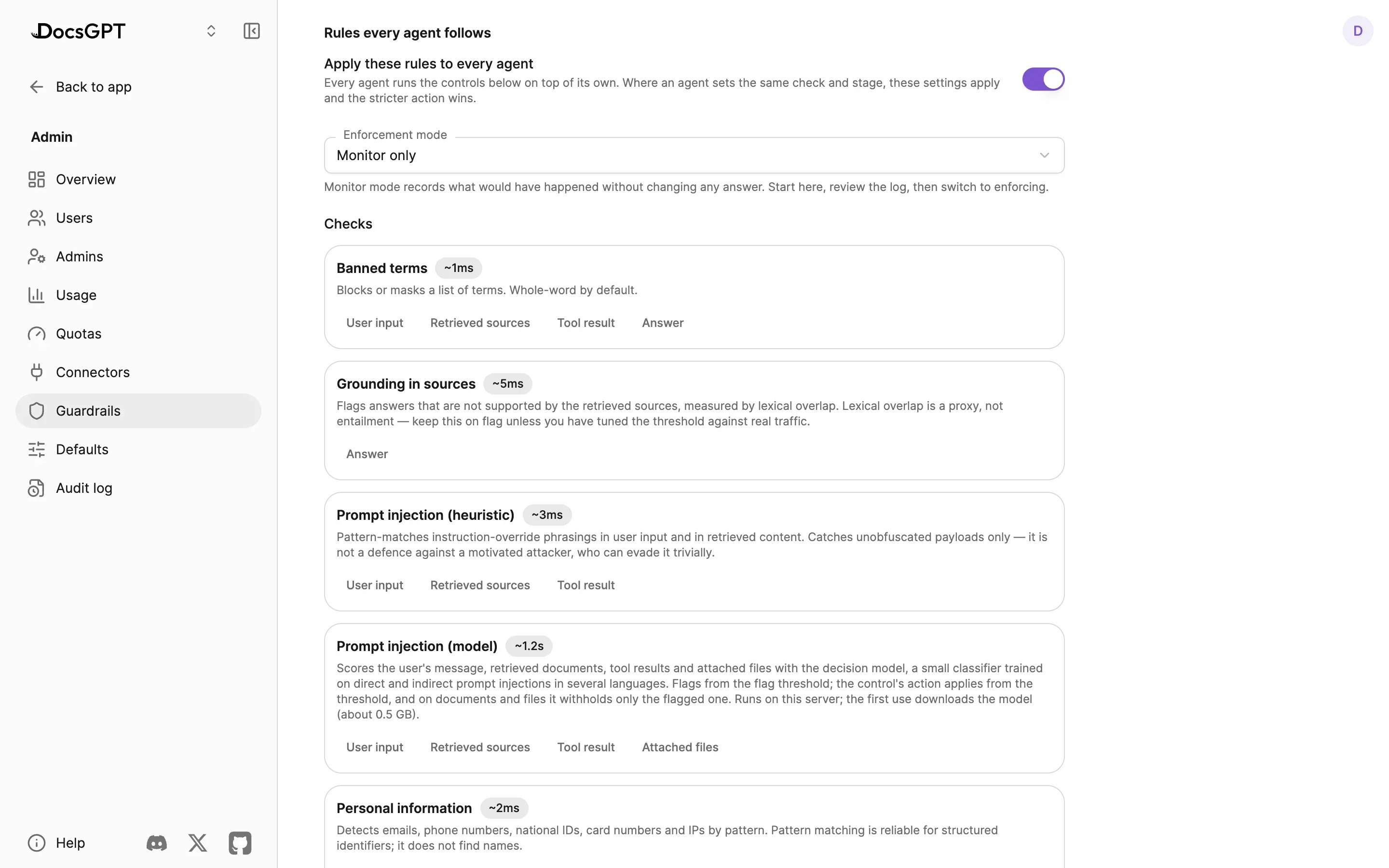
- A prompt-injection model scores user input, retrieved passages, tool results, attachments and MCP tool descriptions, then flags or blocks, as a check in each agent's guardrails and in Admin › Guardrails.
- Relevance reorders retrieved passages, or reorders and filters them, set per source in Knowledge › Source settings as Loose, Balanced or Strict.
The injection model sits beside the existing heuristic check rather than replacing it. A passage it flags is withheld from the answer and badged in its source, where anyone who can edit the source can review it, fix it or mark it safe. The company-wide guardrail floor moved too: it's now a screen, Admin › Guardrails, instead of an environment variable, and Admin › Defaults sets the guardrails every new agent starts with.
By default arc-decide runs on CPU inside the DocsGPT API, in under 1 GB of memory. It can also run as a sidecar container, on a Mac or NVIDIA GPU with docsgpt decide-server, or behind vLLM. Conversation labels and injection checks on messages are comfortable on CPU; Relevance scores many passages per answer and wants a GPU. For air-gapped installs, docsgpt decisions prefetch downloads the model ahead of time. Each job is switched on separately, and all three ship off.
Why it matters: the checks and labels run next to your data, with no extra model bill per message.
A Docs Assistant on Your Own Site
Two changes make DocsGPT a better assistant for a public docs site. The Website source replaces Link, Crawler and Sitemap. Add one page or a whole site, found from its sitemap or by following links; DocsGPT keeps each page's main content as Markdown, stays on the site you started from and refreshes on a schedule. Existing Link, Crawler and Sitemap sources keep syncing.
The chat widget went from 0.9 to 0.13. It docks to the edge of the page as a full-height sidebar or floats as before, speaks eight languages picked from the visitor's browser, lists suggested questions under the welcome card and keeps each visitor's conversation history. A JavaScript API lets your page open it, ask a question for the visitor or react to events. Passthrough values, such as a plan or an account id, travel with each question into the agent's prompt and its Logs. Widget conversations count in the agent's Insights, so the gaps your public docs leave show up next to everything else. Try it at widget.docsgpt.cloud.
Why it matters: the visitor gets an answer on the page they're reading, and you get the list of pages to fix.
Also in 1.1
- A context limit per agent caps the tokens one request sends to the model, for bots and widgets that keep one conversation going for weeks.
- Re-ingesting a source re-embeds only the files that changed.
docsgpt-cli sources upload --syncuses it to keep a source in step with a folder. - Google Drive asks only for the files people pick in Google's picker, and folders and shared drives sync through a service account. Citations from Drive, SharePoint and Confluence open the original file.
- A whole folder can be uploaded at once.
- Artifact cards: the files an answer produced show as cards in the chat and open in a side panel with their versions. Word output takes headings, lists and tables, and API clients can download artifacts.
- Scheduled and webhook runs can use the code executor, and Stop also cancels the background jobs a turn started.
- MCP presets for Airtable, Alpha Vantage, CoinGecko, Context7 and Neon, and the draw.io connect flow works again.
- Admin › Activity is now called Audit log, and the admin console shows user emails.
- The app speaks French.
- Parser fixes for Markdown, RST and JSON, and the recursive chunker takes a token overlap.
Thank you to everyone who contributed code to this release, among them @Asymtode712, @Anandb71, @nabeel001, @prakashNalla, @darshan-shanthveer-patil, @nikhiljangid120, @rohanmalhotracodes, @chukka-venugopalam, @georgeatparallel, @INEcodes, @Sarcastic-Soul, @CephasCoots-12, @sonu7089, @Ritwik-Mallavarapu, @qizwiz, @SUJALSPATEL, @qiyuhuating, @Inbakumar17 and @abhay-2108.
Upgrading From 1.0
Read Upgrading to 1.1.0 before you pull. Five changes need attention:
- Uploads, connector ingests, re-ingests, syncs and graph builds run on a new Celery queue,
ingest. A worker started with an explicit-Qlist must add it, or new sources stay in "processing".- New Google Drive sign-ins ask only for the files people pick (
drive.file). Enable the Google Picker API, and setGOOGLE_SERVICE_ACCOUNT_KEYorGOOGLE_DRIVE_ACCESS=readonlyto keep syncing whole folders. Existing connections keep working.GUARDRAILS_FLOORis deprecated. Its value is stored as the instance floor on the first start, then edited in Admin › Guardrails.- The decision model's features ship off. If you set
DECISION_ANALYTICS_ENABLED=true, a worker must consume the newanalyticsqueue.- Migrations 0053 to 0057 run on start. 0057 builds an index concurrently, which can take a while on a large install.
The changelog and the release on GitHub have the rest.
What's Next
Over the next weeks we'll go deeper on Insights, the Activity tab and how arc-decide was trained. If you want to see Insights on your own documents, Insights shows what it covers, and Deploy compares Cloud, Managed, on-premises and air-gapped.