DocsGPT 0.17: Production-Grade from the Ground Up
A reworked model registry with hot-swap from the UI, user data moved to Postgres, an async ASGI server with a search service, and OpenTelemetry.
Pavel Torbin6 min readreleasedeployment
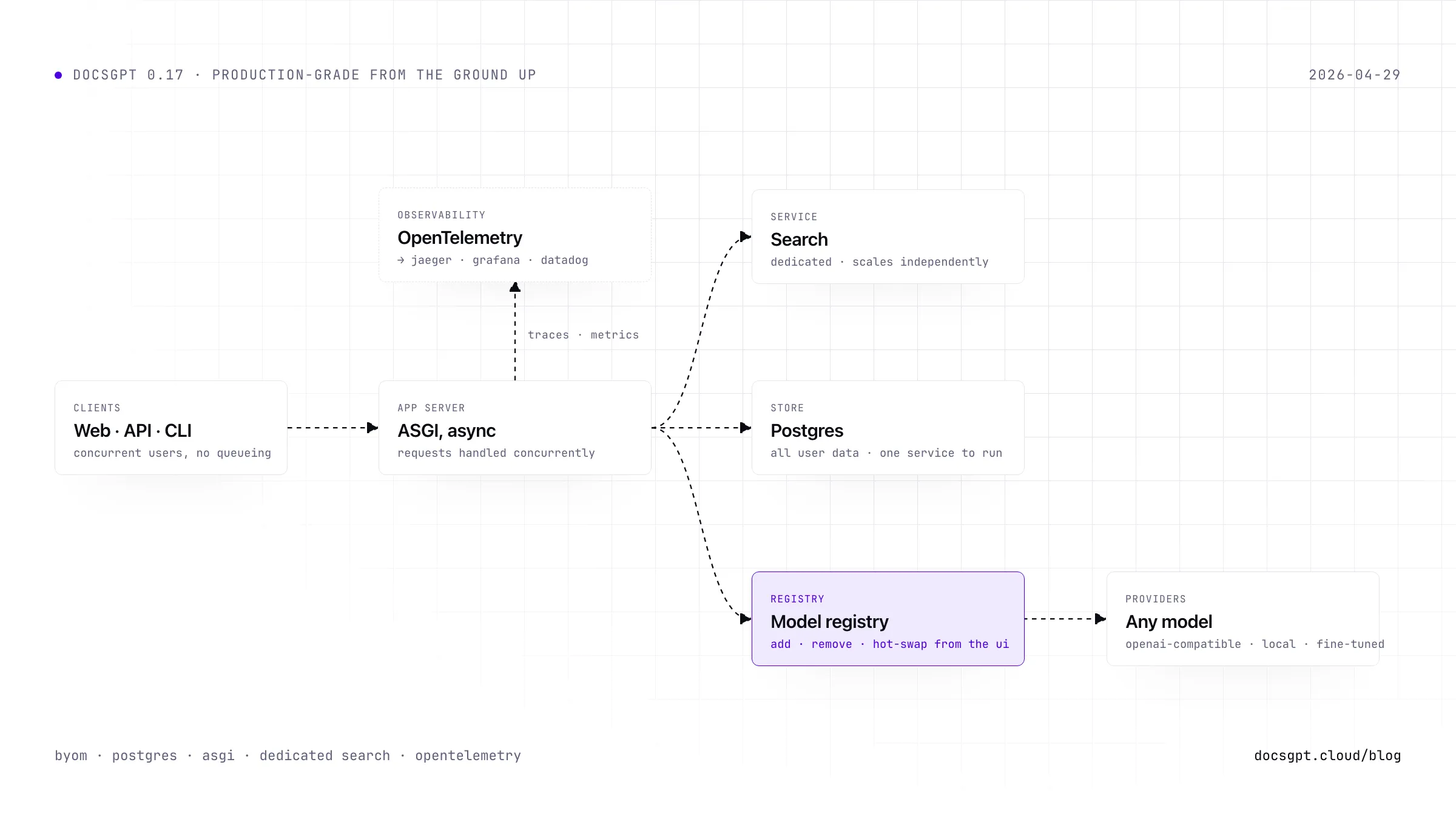
The gap between "runs on my laptop" and "runs in production" is where most open-source projects lose people. You get the demo working, you show it to your team, someone asks "can we monitor this?" and suddenly you're writing glue code for three weeks. DocsGPT 0.17 closes that gap. A reworked model registry with hot-swap from the UI, user data moved to Postgres, an async ASGI server with a dedicated search service, and OpenTelemetry baked in.
Add Any Model, Swap It Live
Before 0.17, connecting a custom model to DocsGPT meant editing config files and restarting the entire application. It worked, but it felt like changing a tire on a moving car — except you had to stop the car first.
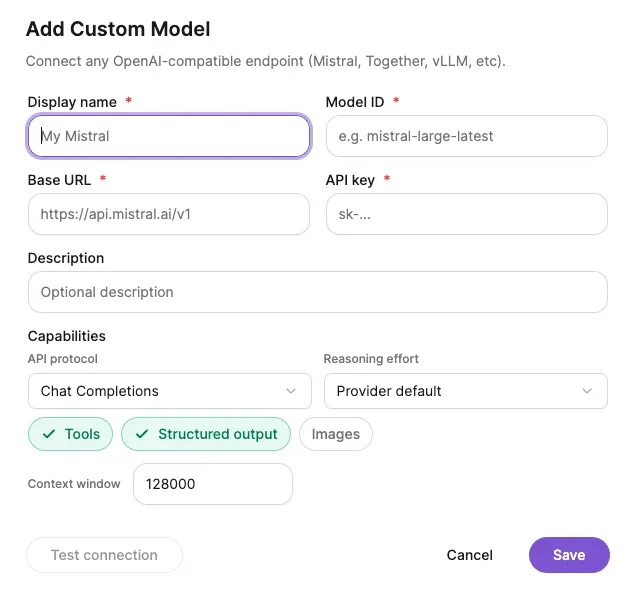
The model registry has been completely reworked. You can now add, remove, and switch between models directly from the DocsGPT UI. No restart. No rebuild. Hot-swap in seconds.
Running a fine-tuned model on your own infrastructure? Add the endpoint. Want to test a new provider without committing to it? Drop it in, run some queries, pull it out. Your team prefers different models for different tasks? Set them up side by side.
Why this matters: The AI model landscape shifts weekly. Locking yourself into one provider or one model config that requires a deploy cycle to change is a liability. BYOM with hot-swap means your DocsGPT instance adapts as fast as the ecosystem does.
User Data Moves to Postgres
All user data now lives in Postgres. The application footprint is lighter, queries are faster, and for most teams, it means one fewer service to learn and monitor — because you're probably already running Postgres somewhere in your stack.
This is a breaking change for existing deployments. If you're upgrading from 0.16.x, you must complete the Postgres Migration before pulling the new images. Do not run docker compose pull first. The migration guide walks you through the process step by step, and we've tested it across a range of deployment sizes.
Why this matters: Postgres is battle-tested, widely understood, and supported by every major cloud provider and monitoring tool out there. Moving user data to Postgres means your DocsGPT deployment plugs into the operational tooling your team already trusts.
- 01
Stay on 0.16.x for now
Do not pull the new images first. The upgrade order is the whole point of this step.
docker compose pull ← not yet
- 02
Complete the Postgres migration
Follow the migration guide step by step. It has been tested across a range of deployment sizes.
docs.docsgpt.cloud/Deploying/Postgres-Migration
- 03
Pull the 0.17 images
User data now lives in Postgres, alongside whatever else your stack already runs there.
docker compose pull
Async Server + Dedicated Search
The application server has moved to ASGI, which means DocsGPT now handles requests asynchronously. Concurrent users no longer queue behind each other. If one user kicks off a heavy retrieval job, everyone else keeps moving.
Search has also been split into its own dedicated service. This lets you scale search independently from the rest of the application - useful when your document corpus grows large enough that retrieval becomes the bottleneck, not generation.
Why this matters: These are the kinds of architectural changes that don't show up in a feature list but determine whether DocsGPT holds up under real load. Async request handling and independent search scaling are table stakes for production deployment, and now they're the default.
Text version
Several concurrent requests enter the ASGI app server, which handles them asynchronously instead of queueing them. Retrieval goes to a separate Search service, highlighted, that reads the document index and can be scaled on its own; the retrieved context then goes to LLM generation and the answer returns to the caller. Heavy retrieval for one user no longer blocks the others.
OpenTelemetry Observability
DocsGPT 0.17 ships with OpenTelemetry instrumentation built in. Traces and metrics flow out of the box - plug them into Jaeger, Grafana, Datadog, or whatever your team already uses.
You can trace a user query from the moment it hits the API through retrieval, reranking, and LLM generation. When something is slow, you'll know exactly which stage is the bottleneck. When something fails, you'll have the trace to prove it.
Why this matters: You can't operate what you can't see. The Postgres move gives you a database your ops team knows how to monitor. OpenTelemetry gives them the application-level signals to match. Together, they make DocsGPT a system you can hand off to an SRE team with a straight face.
Security and Maintenance
Beyond the headline features, 0.17 includes a round of security and infrastructure hardening:
- Public threat model published to
.github/THREAT_MODEL.md, so security researchers and enterprise evaluators can see exactly what's in scope - Incident response playbook added and linked from
SECURITY.md - Zizmor security workflow added to GitHub Actions for automated CI security scanning
- 30+ dependency updates across the backend, frontend, and React widget — covering
cryptography,dompurify,langchain-core,openai,google-genai, and more
None of this is flashy. All of it is the kind of work that separates a project you fork and experiment with from one you'd actually put in front of users.
Get Started
DocsGPT 0.17 is the foundation for what comes next. The model registry, Postgres backend, async architecture, and observability stack are all building toward a platform that's as easy to operate as it is to use.
- Try DocsGPT Cloud
- Explore the Repository
- Join our Community on Discord, X and LinkedIn